Posts Tagged accessibility
Rotation Speed (Sam Bettens parody lyrics) and a new version of Lifetiler
Posted by Angela Brett in My Software, News on August 14, 2025
This is a parody of Coasting Speed by Sam Bettens, because ever since I learnt the phrase ‘rotation speed’ from Mentour Pilot, I’ve had it in my head to the tune of Coasting Speed every time I’ve taken off (as a passenger) in an aeroplane. I’ve added a little to this parody with each flight. This is from the perspective of the flight crew and cabin crew, talking to the passengers.
The takeoff’s cleared
We’ve finally reached
rotation speed
We known we’re each
prepared for takeoff
and we start to fly
You board your flight
You stow your bags
Tray tables up
Do your belts up tight
We know you’re ready
As we get you high
But it’s not a rush
We take our time
your life
is in our hands
Ohhh
When the engine’s drowning out all other sound
When the landing just won’t stick, and we go around
We won’t let you, we won’t let you down
but we’ll get you down
At altitude
We are pressurised
We’ve got attitude
And you inside
So you’re breathing easy
When you’ve got to fly
But the flight goes on
And on and on
It might seem much too long
Ohhhh
When the engine’s drowning out all other sound
When the landing just won’t stick, and we go around
We won’t let you, we won’t let you down
but we’ll get you down
Sometimes life is scary when you’re all up in the air
But we’ll be there
We won’t let you down
but we’ll get you down.
We won’t let you down.
The engine blocks all other sound,
The landing sticks, we won’t go around
We won’t let you, we won’t let you down
but we’ll get you down.
We won’t let you down
but we’ll get you down.
We won’t let you down
but we’ll get you down.
∎
I think parts of this could still be improved, but I’ve decided that each time I release a minor update to an app, I should post about it, and include an old song parody or poem that’s been gathering dust each time — that way, two things that might not have been enough to post about on their own will both get posted.
This one is probably good enough to post by itself, especially as I’ve also written another partial parody about aviation, which I will put later in this post. But first, an ‘ad break’ for the new version of Lifetiler! After releasing Seddit a week ago, I set to work fixing some issues I had noticed in Lifetiler, the app I wrote to chart my once-long-distance relationship with Joey Marianer. I have now released version 1.2, with the following fixes:
- Features
- Pinch-to-zoom is now supported in the Tiles view, both on iOS and macOS. Previously you could only change the tile size using a slider at the bottom of the screen, and I don’t know why I didn’t think of pinch-to-zoom before. The slider is still there, but now you can also use pinch-to-zoom, or the zoom rotor setting in VoiceOver.
- On macOS, you can now change the width of the ‘Export as Image’ and ‘Document Settings’ panels
- Fixes for large font sizes on iOS and iPadOS
- I’ve fixed several screens where text was cut off or just poorly laid-out at larger font sizes.
- I’ve made sure tiles scale according to the font size setting, in the ‘List’ screen/pane, as the default size for the main ‘Tiles’ screen, and for the list of existing symbols when adding a date range, and settings for how to show tiles not in date ranges, or in simplified mode (where all tiles within date ranges are shown as the same symbol.)
- Fixes for VoiceOver (and probably other assistive technologies)
- I’ve made the VoiceOver interface correctly reflect what is seen in simplified mode, and for empty tiles
- I’ve fixed a bug whereby the tiles in the existing symbols list, and settings for how to show tiles not in date ranges, or in simplified mode, were not accessible to VoiceOver if they were currently set to coloured squares rather than emoji.
You can get the new version on the App Stores for macOS 15 Sequoia or later and iOS/iPadOS 17 or later.
Okay, now for the other aviation-related song parody I promised. This is a parody of the chorus of the Galilee Song, a hymn we used to sing at my Catholic high school. The original lyrics go:
So I leave my boats behind!
Leave them on familiar shores!
Set my heart upon the deep!
Follow you again, my Lord!
But when you’re evacuating an aeroplane in water, remember God helps those who help themselves… so here’s what you should be thinking:
So I leave my bags behind
Leave through unfamiliar doors
Set my raft upon the deep
Pull my life vest inflate cord
That’s all from me for now! I’m off to apply for more jobs and work on more features in Seddit.
Seddit: A text-to-speech Reddit reader for iOS and macOS
Posted by Angela Brett in My Software on August 6, 2025
A while ago my friend Brynn told me she’d love an app which would continuously read posts and comments from Reddit using text-to-speech, with minimal user interaction. This seemed like a fun project, so just after I released the macOS version of Lifetiler, I started working on it. It was indeed a fun project! And now it’s also on the App Store as a fun and useful app that you can use. It’s completely free, though if you would like to thank me for the effort, on the Settings screen there’s an in-app purchase tip jar which will give you a compliment (courtesy of NiceWriter) for each tip.

To use Seddit, you start by pressing the + button to load either a specific post from a URL, or a number of the best, hot, new, etc. posts from a subreddit. You can load more posts from other subreddits whenever you like. Then you press the Play button, and Seddit will read through the posts and comments you’ve loaded. You can configure which voice, rate, and pitch to use in the Settings, or set it up to use your VoiceOver voice settings whenever VoiceOver is running.
Seddit supports the main things that most audio apps do. You can AirPlay to another device. You can skip any posts or comment threads you’re not interested in using the buttons in the app, on your Mac keyboard or iOS lock screen, or on your headphones, for instance.
If you really want to sit back and listen without fiddling with anything, you can set up Seddit to automatically load more posts whenever it is running out of content to speak. And if you’re sitting so far back that you want to go to sleep while listening and not fiddle with the app to turn it off, you can use the Sleep Timer to have Seddit automatically stop speaking after a certain amount of time.
The posts you have loaded will be synched between devices that are signed into the same iCloud account, so you can start listening on one device and continue on a different one. Note that if you switch devices in the middle of a post or comment, the post or comment will be started from the beginning.

Since Seddit is more intended for passive consumption of discussions, it does not support commenting, or viewing images within the app. However, if you navigate to a post in the app, you can follow links to view the post, external link, or images on the web. You can also set up Seddit to skip reading posts that have only a link or image in the post body.
I always pay attention to accessibility when writing apps, but Seddit in particular was developed with the blind and low-vision community in mind. Brynn is blind herself, and let me know while testing the app if there were ways I could improve accessibility. Please let me know if you find any issues.
Feel free to download Seddit and try it out!
I’m also continuing to look for a day job, so I can afford to keep Seddit free to use. Let me know if you spot one I’d be great at!
My year is only going to get weirder, so I’d better fill you in.
Posted by Angela Brett in News on August 2, 2024
A lot has happened so far this year, and a lot more is about to happen. I have pics, so it did happen. TL; DR: I saw K’s Choice again, went to CERN again, went on the JoCo Cruise again, and will be moving to the USA in August. Just read the blue ‘Visa news’ section and the August part if you want to know how the US visa process went.
January: K’s Choice in Gent
🇺🇸Visa news
In mid-January, I got an email that began ‘Thank you for being a valued U.S. Consular Electronic Application Center (CEAC) customer.’ indicating that I’d finally got past step 1 of the 12-step program for me to quit Austria and go move in with the lovely Joey Marianer in the USA. Thus began a new phase of filling in forms and collecting documents.
On January 26, I went to Gent to see K’s Choice, one of the bands I have seen a fair bit at various places in Europe. I hadn’t them them since they were last in Vienna in 2017, so I missed them. A friend I know from JoCo fandom had suggested we go together. Unfortunately, she was too sick to go, but I did reconnect with someone I met at my very first K’s Choice concert, in Hamont-Achel in 2009.
Sam Bettens, the lead singer of K’s Choice, recently published a book which described (among many other things) his experience of moving to the USA to be with a spouse, as I am about to do. Even though the marriage didn’t work out, living in the USA did, so that was comforting to read about, as I mentioned to him after the show. I had too many things I wanted to say in a short time, and was a little flustered, so I forgot to ask for permission to post videos of the show, but they’ve always given it in the past, so here you go:
February: CERN Third Collisions
🇺🇸Visa news
In early February, I was notified that my Immigrant Visa Case had become Documentarily Qualified, meaning I’d completed step 9 of the process and just had to wait for my interview to be scheduled.
From 9–11 February, CERN had an event called Third Collisions, where CERN alumni could socialise, see some talks, and visit the new Science Gateway exhibits and the LHC experiments underground. I visited ALICE, because it was the only one of the four main detectors that I wasn’t 100% sure I’d seen before.
I haven’t put too much from the CERN visit online yet, but here’s a playlist where I will add videos:
Among other things, the Science Gateway had this tactile model of a particle detector, with an audio description to guide the visitor in feeling around the different parts of it. The various parts of the detector were differentiated with high-contrast colours and textures. Before visiting the Science Gateway, I happened to talk to someone who was involved in developing this; they had many ideas and prototypes for ways to explain particle detectors to blind and low-vision folk, and a lot of feedback from such people, and this is the only finished product that ended up in the exhibit.
Ironically, since I’m editing this post on my iPad, I can’t figure how to add alt text to this picture, but I think the audio description does a better job than I would have.

When I arrived in Vienna ten years ago, I assumed that I would soon forget French to learn German, so I did the DALF C1 exam to have proof that I once knew French. When I arrived in Geneva and had a conversation with a stranger at a bus stop, I realised I neither forgot French nor learned German — it was still so much easier to communicate in French. I did not make the most of this opportunity to learn German. This is partially because of circumstances (having to stop in the middle of four different B1-level German courses for different reasons, spending most of a year in NZ, and another few years hardly going outside due to the pandemic) but mostly because I didn’t put as much effort in. Or at least I didn’t listen to as many podcasts or read as many books in the language. Oh well; my level of German might still impress people in America.
March: JoCo Cruise (and a little MarsCon)
I shouldn’t need to tell you what JoCo Cruise is again. It’s where I met Joey, and thus, ultimately the reason I’m moving to the States. Joey and I stayed in Minnesota for a bit before this year’s cruise, because the flights from there to the cruise were more convenient, and it also gave us a chance to hang out with people we know from the MarsCon Comedy Music Track. As is often the case, MarsCon was on the same weekend as the start of the cruise, so we didn’t get to go, but at least we got to see people who arrived early.
We also saw a Jonathan Coulton and Aimee Mann concert with some friends from MarsCon and the cruise. At the show they mentioned, but did not play, a song Aimee Mann wrote based on a ChatGPT-generated title of a typical Jonathan Coulton song, ‘The Ballad of Captain Quark’. As someone who’s quite interested in quarks, I mentioned to JoCo on the cruise that I’d like to see it, and Aimee sang it at the final concert. Simalot posted video from the red team show and b$ shot this video of it on my camera in the gold team show.
Here is a playlist of the 25 hours, 5 minutes, and 17 seconds of unique JoCo Cruise 2024 footage captured by my cameras (some filmed by Joey on my second camera while I was at other events, some filmed by b$ while I was isolating in the cabin.)
🇺🇸Visa news
On the second-to-last day of JoCo Cruise, while Joey and I were holed up in our cabin getting over whatever lurgy we had caught (Joey tested negative for COVID, but it was an antigen test that didn’t come with instructions, so who knows?) we heard that my immigrant visa interview had been scheduled, which is to say, we’d reached step 10 of the immigration process.
April: US Visa Issued
Okay, I don’t have a video of this, but unless you’re an immigration officer working at the Port of New York and New Jersey in August, you’re not the people I have to prove it to. I heard that my visa was granted almost exactly 24 hours after leaving the visa interview (where they’d already told me I met the requirements, so it was not an agonising wait.) I then picked up my passport with the visa in it during my lunch break the next day.
I have six months from the date of issue to enter the country, at which point they will validate the visa and it will be good for a year, during which time I will receive an actual green card in the mail which will be valid for longer.
I then gave notice at my job and my apartment and figured out a moving company. Joey flew to Vienna not long ago, to help me with moving and then take me home. I am not keeping any of my furniture, so if you’re in Vienna and want some tables, bookcases, or other kinds of shelving or storage, let me know. Most of it has been claimed by now, though.
August: Moving to the USA
Joey and I will take the Queen Mary 2 from Hamburg to New York City, because that seemed like a sufficiently ridiculous way for me to immigrate. In NYC we plan to at least visit Ellis Island (it seems appropriate to do that after immigrating by sea) MoMath, Central Park (mainly because I love the Apple TV+ show by that name), 826NYC, and maybe Club Cumming, if JoCo Cruise 2024 and 2025 guest Daphne Always will be performing there. If you have any other suggestions on what to see in NYC, let me know! We haven’t decided yet when or how we’ll get from there to Joey’s place in the Seattle area.
After that, we’ll likely go to FuMPFest at Con on the Cob in October and MathsJam Annual Gathering (back on this side of the pond) in November, but the future hasn’t been written yet!
Getting Sick in the World of Health — Down the Rabbit Hole
Posted by Angela Brett in video on March 30, 2021
This weekend my friend Rob Lambert asked me to lend my vocal stylings to an animation he was making about his experience of suddenly getting sick. While my vocals are not nearly as stylish as his, I did indeed record my part — some scripted by Rob, some my own reactions to what he had to say. I think it turned out great; check it out!
I think this video is a good reminder of the second point in my Accessibility is for Everyone article. Learn to notice, appreciate, and contribute to the rabbit hole climbing harnesses around you before you need them.
If you want to see more from Rob, check out his LinkedIn or subscribe to his YouTube channel, which also has some cool CERN stuff. On the subject of LinkedIn, here’s mine! I’m currently looking for full-time or freelance work, and I’d love to work on something related to accessibility, or any of the other things I’ve enthused about or experimented with on this blog.
Accessibility is for Everyone
Posted by Angela Brett in Culture, News on February 26, 2021
Accessibility is for everyone. I say that whenever an abled person finds a way that an accessibility feature benefits them. But that’s not all that it means. There are really three different meanings to that phrase:
- Accessibility exists to make things accessible to everyone.
- At some point, everyone has some kind of impairment which accessibility can help them with.
- Changes that make things more accessible can be useful, convenient, or just plain fun, even for people who are 100% unimpaired.
Is this article for everyone?
This is a bare-bones outline of ways accessibility is for everyone, with a few lists of examples from my personal experience, and not much prose. This topic is fractal, though, and like a Koch Snowflake, even its outline could extend to infinite length. I’ve linked to more in-depth references where I knew of them, but tried not to go too far into detail on how to make things accessible. There are much better references for that — let me know of the ones you like in the comments.
I am not everyone
Although I do face mobility challenges in the physical world, as a software developer, I know the most about accessibility as it applies to computers. Within that, I have most experience with text-to-speech, so a lot of the examples relate to that. I welcome comments on aspects I missed. I am not an expert on accessibility, but I’d like to be.
The accessibility challenges that affect me the most are:
- A lack of fluency in the language of the country I live in
- Being short (This sounds harmless, but I once burnt my finger slightly because my microwave is mounted above my line of sight.)
- Cerebral palsy spastic diplegia
That last thing does not actually affect how I use computers very much, but it is the reason I’ve had experience with modern computers from a young age.
Accessibility makes things accessible to everyone
Accessibility is for everyone — it allows everyone to use or take part in something, not just people with a certain range of abilities. This is the real goal of accessibility, and this alone is enough to justify improving accessibility. The later points in this article might help to convince people to allocate resources to accessibility, but always keep this goal in mind.
Ideally, everyone should be able to use a product without asking for special accommodations. If not, there should be a plan to accommodate those who ask, when possible. At the very least, nobody should be made to feel like they’re being too demanding just for asking for the same level of access other people get by default. Accessibility is not a feature — lack of accessibility is a bug.
Don’t make people ask
If some people have to ask questions when others don’t, the product is already less accessible to them — even if you can provide everything they ask for. This applies in a few scenarios:
- Asking for help to use the product (e.g. help getting into a building, or using a app)
- Asking for help accessing the accessibility accommodations. For example, asking for the key for an elevator, or needing someone else to configure the accessibility settings in software. Apple does a great job of this by asking about accessibility needs, with the relevant options turned on, during installation of macOS.
- Asking about the accommodations available to find out if something is accessible to them before wasting time, spoons, or money on it. Make this information publicly available, e.g. on the website of your venue or event, or in your app’s description. Here’s a guide on writing good accessibility information.
Asking takes time and effort, and it can be difficult and embarrassing, whether because someone has to ask many times a day, or because they don’t usually need help and don’t like acknowledging when they do.
In software, ‘making people ask’ is making them set up accessibility in your app when they’ve already configured the accessibility accommodations they need in the operating system. Use the system settings, rather than having your own settings for font size, dark mode, and so on. If the user has to find your extra settings before they can even use your app, there’s a good chance they won’t. Use system components as much as possible, and they’ll respect accessibility options you don’t even know about.
If they ask, have an answer
Perhaps you don’t have the resources to provide certain accommodations to everyone automatically, or it doesn’t make sense to. In that case:
- make it clear what is available.
- make asking for it as easy as possible (e.g. a checkbox or text field on a booking form, rather than instructions to call somebody)
- make an effort to provide whatever it is to those who ask for it.
Assume the person really does need what they’re asking for — they know their situation better than you do.
If the answer is ‘no, sorry’, be compassionate about it
If you can’t make something accessible to a given group of people, don’t feel bad; we all have our limitations. But don’t make those people feel bad either — they have their limitations too, and they’re the ones missing out on something because of it. Remember that they’re only asking for the same thing everyone else gets automatically — they didn’t choose to need help just to annoy you.
If you simply didn’t think about their particular situation, talk with them about steps you could take. Don’t assume you know what they can or can’t do, or what will help them.
Everyone can be impaired
Accessibility is for everyone. But just like how even though all lives matter it is unfortunately still necessary to remind some people that black lives do, to achieve accessibility for everyone, we need to focus on the people who don’t get it by default. So who are they?
Apple’s human interface guidelines for accessibility say this better than I could:
Approximately one in seven people worldwide have a disability or impairment that affects the way they interact with the world and their devices. People can experience impairments at any age, for any duration, and at varying levels of severity. Situational impairments — temporary conditions such as driving a car, hiking on a bright day, or studying in a quiet library — can affect the way almost everyone interacts with their devices at various times.
Almost everyone.
This section will mostly focus on accessibility of devices such as computers, tablets, and phones. It’s what I know best, and malfunctioning hardware can be another source of impairment. Even if you don’t consider yourself disabled, if you haven’t looked through the accessibility settings of your devices yet, do so — you’re sure to find something that will be useful to you in some situations. I’ll list some ways accessibility can help with hardware issues and other situational impairments below.
Apple defines four main kinds of impairment:
Vision
There’s a big gap between someone with 20/20 full-colour vision in a well-lit room looking at an appropriately-sized, undamaged screen, and someone with no vision whatsoever. There’s even a big gap between someone who is legally blind and someone with no vision whatsoever. Whenever we are not at the most abled end of that spectrum, visual accessibility tools can help.
Here are some situations where I’ve used Vision accessibility settings to overcome purely situational impairments:
- When sharing a screen over a videoconference or to a projector, use screen zoom, and large cursor or font sizes. On macOS when using a projector, you can also use Hover Text, however this does not show up when screensharing over a videoconference. This makes things visible to the audience regardless of the size of their videoconference window or how far they are from the projector screen.
- When an internet connection is slow, or you don’t want to load potential tracking images in emails, image descriptions (alt text) let you know what you’re missing.
- When a monitor doesn’t work until the necessary software is installed and configured, use a screenreader to get through the setup. I’ve done this on a Mac, after looking up how to use VoiceOver on another device.
Hearing
There’s a big gap between someone with perfect hearing and auditory processing using good speakers at a reasonable volume in an otherwise-quiet room, and someone who hears nothing at all. There’s even a big gap between someone who is Deaf and someone who hears nothing at all. Whenever we are not at the most abled end of that spectrum, hearing accessibility tools can help.
Here are some situations where I’ve used Hearing accessibility settings when the environment or hardware was the only barrier:
- When one speaker is faulty, change the panning settings to only play in the working speaker, and turn on ‘Play stereo audio as mono’.
- When a room is noisy or you don’t want to disturb others with sound, use closed captions.
Physical and Motor
There’s a big gap between someone with a full range of controlled, pain-free movement using a perfectly-functioning device, in an environment tailored to their body size, and someone who can only voluntarily twitch a single cheek muscle (sorry, but we can’t all be Stephen Hawking.) Whenever we are not at the most abled end of that spectrum, motor accessibility tools can help.
Here are some situations where you can use Physical and Motor accessibility to overcome purely situational impairments:
- When a physical button on an iPhone doesn’t work reliably, use Back Tap, Custom Gestures, or the AssistiveTouch button to take over its function.
- When you’re carrying something bulky, use an elevator. I’ve shared elevators with people who have strollers, small dogs, bicycles, suitcases, large purchases, and disabilities. I’ve also been yelled at by someone who didn’t think I should use an elevator, because unlike him, I had no suitcase. Don’t be that person.
Literacy and Learning
This one is also called Cognitive. There’s a big gap between an alert, literate, neurotypical adult of average intelligence with knowledge of the relevant environment and language, and… perhaps you’ve thought of a disliked public figure you’d claim is on the other end of this spectrum. There’s even a big gap between that person and the other end of this spectrum, and people in that gap don’t deserve to be compared to whomever you dislike. Whenever we are not at the most abled end of that spectrum, cognitive accessibility considerations can help.
Here are some situations where I’ve used accessibility when the environment was the only barrier to literacy:
- When watching or listening to content in a language you know but are not fluent in, use closed captions or transcripts to help you work out what the words are, and find out the spelling to look them up.
- When reading in a language you know but are not fluent in, use text-to-speech in that language to find out how the words are pronounced.
- When consuming content in a language you don’t know, use subtitles or translations.
Accessibility features benefit abled people
Sometimes it’s hard to say what was created for the sake of accessibility and what wasn’t. Sometimes products for the general public bring in the funding needed to improve assistive technologies. Here are some widely-used things which have an accessibility aspect:
- The Segway was based on self-balancing technology originally developed for wheelchairs. Segways and the like are still used by some people as mobility devices, even if they are not always recognised as such.
- Voice assistants such as Siri rely on speech recognition and speech synthesis technology that has applications in all four domains of accessibility mentioned above.
- Light or Dark mode may be a style choice for one person and an essential visual accessibility tool for another.
Other technology is more strongly associated with accessibility. Even when your body, your devices, or your environment don’t present any relevant impairment, there are still ways that these things can be useful, convenient, or just plain fun.
Useful
Some accessibility accommodations let abled people do things they couldn’t do otherwise.
- Transcripts, closed captions, and image descriptions are easily searchable.
- I’ve used text-to-speech APIs to generate the initial rhyme database for my rhyming dictionary, rhyme.science
- I’ve used text-to-speech to find out how words are pronounced in different languages and accents.
- Menstruators can use handbasins in accessible restroom stalls to rinse out menstrual cups in privacy. (This is not an argument for using accessible stalls when you don’t need them — it’s an argument for more handbasins installed in stalls!)
Convenient
Some accessibility tech lets abled people do things they would be able to do without it, but in a more convenient way.
- People who don’t like switching between keyboard and mouse can enable full keyboard access on macOS to tab through all controls. They can also use keyboard shortcuts.
- People who don’t want to watch an entire video to find out a piece of information can quickly skim a transcript.
- I’ve used speak announcements on my Mac for decades. If my Mac announces something while I’m on the other side of the room, I know whether I need to get up and do something about it.
- Meeting attendees could edit automatic transcripts from videoconferencing software (e.g. Live Transcription in Zoom) to make meeting minutes.
- I’ve used text-to-speech on macOS and iOS to speak the names of emojis when I wasn’t sure what they were.
- Pre-chopped produce and other prepared foods save time even for people who have the dexterity and executive function to prepare them themselves.
Fun
Some accessibility tech lets us do things that are not exactly useful, but a lot of fun.
- Hosts of the Lingthusiasm podcast, Lauren Gawne and Gretchen McCulloch, along with Janelle Shane, fed transcripts of their podcasts into an artificial intelligence to generate a quirky script for a new episode, and then recorded that script.
- I’ve used text-to-speech to sing songs I wrote that I was too shy to sing myself.
- I’ve used text-to-speech APIs to detect haiku in any text.
- Automated captions of video conferencing software and videos make amusing mistakes that can make any virtual party more fun. Once you finish laughing, make sure anyone who needed the captions knows what was really said.
- I may have used the ’say’ command on a server through an ssh connection to surprise and confuse co-workers in another room. 😏
- I find stairs much more accessible if they have a handrail. You might find it much more fun to slide down the balustrade. 😁
Advocating accessibility is for everyone
I hope you’ve learnt something about how or why to improve accessibility, or found out ways accessibility can improve your own life. I’d like to learn something too, so put your own ideas or resources in the comments!
Audio Word Clouds
Posted by Angela Brett in News on August 1, 2020
For my comprehensive channel trailer, I created a word cloud of the words used in titles and descriptions of the videos uploaded each month. Word clouds have been around for a while now, so that’s nothing unusual. For the soundtrack, I wanted to make audio versions of these word clouds using text-to-speech, with the most common words being spoken louder. This way people with either hearing or vision impairments would have a somewhat similar experience of the trailer, and people with no such impairments would have the same surplus of information blasted at them in two ways.
I checked to see if anyone had made audio word clouds before, and found Audio Cloud: Creation and Rendering, which makes me wonder if I should write an academic paper about my audio word clouds. That paper describes an audio word cloud created from audio recordings using speech-to-text, while I wanted to create one from text using text-to-speech. I was mainly interested in any insights into the number of words we could perceive at once at various volumes or voices. In the end, I just tried a few things and used my own perception and that of a few friends to decide what worked. Did it work? You tell me.

Voices
There’s a huge variety of English voices available on macOS, with accents from Australia, India, Ireland, Scotland, South Africa, the United Kingdom, and the United States, and I’ve installed most of them. I excluded the voices whose speaking speed can’t be changed, such as Good News, and a few novelty voices, such as Bubbles, which aren’t comprehensible enough when there’s a lot of noise from other voices. I ended up with 30 usable voices. I increased the volume of a few which were harder to understand when quiet.
I wondered whether it might work best with only one or a few voices or accents in each cloud, analogous to the single font in each visual word cloud. That way people would have a little time to adapt to understand those specific voices rather than struggling with an unfamiliar voice or accent with each word. On the other hand, maybe it would be better to have as many voices as possible in each word cloud so that people could distinguish between words spoken simultaneously by voice, just as we do in real life. In the end I chose the voice for each word randomly, and never got around to trying the fewer-distinct-voices version. Being already familiar with many of these voices, I’m not sure I would have been a good judge of whether that made it easier to get used to them.
Arranging the words
It turns out making an audio word cloud is simpler than making a visual one. There’s only one dimension in an audio word cloud — time. Volume could be thought of as sort of a second dimension, as my code would search through the time span for a free rectangle of the right duration with enough free volume. I later wrote an AppleScript to create ‘visual audio word clouds’ in OmniGraffle showing how the words fit into a time/volume rectangle. I’ve thus illustrated this post with a visual word cloud of this post, and a few audio word clouds and visual audio word clouds of this post with various settings.
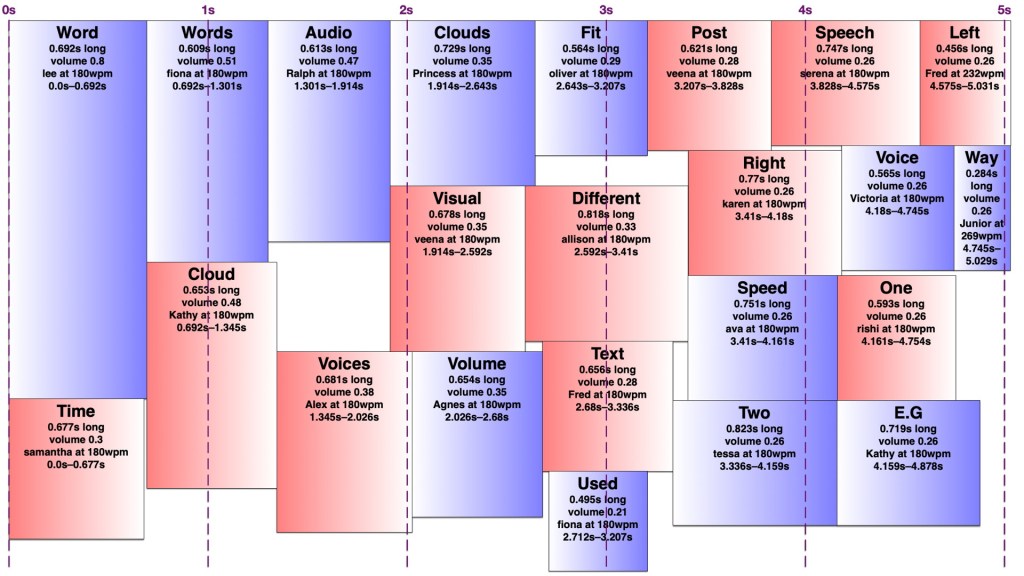
However, words in an audio word cloud can’t be oriented vertically as they can in a visual word cloud, nor can there really be ‘vertical’ space between two words, so it was only necessary to search along one dimension for a suitable space. I limited the word clouds to five seconds, and discarded any words that wouldn’t fit in that time, since it’s a lot easier to display 301032 words somewhat understandably in nine minutes than it is to speak them. I used the most common (and therefore louder) words first, sorted by length, and stopped filling the audio word cloud once I reached a word that would no longer fit. It would sometimes still be possible to fit a shorter, less common word in that cloud, but I didn’t want to include words much less common than the words I had to exclude.
I set a preferred volume for each word based on its frequency (with a given minimum and maximum volume so I wouldn’t end up with a hundred extremely quiet words spoken at once) and decided on a maximum total volume allowed at any given point. I didn’t particularly take into account the logarithmic nature of sound perception. I then found a time in the word cloud where the word would fit at its preferred volume when spoken by the randomly-chosen voice. If it didn’t fit, I would see if there was room to put it at a lower volume. If not, I’d look for places it could fit by increasing the speaking speed (up to a given maximum) and if there was still nowhere, I’d increase the speaking speed and decrease the volume at once. I’d prioritise reducing the volume over increasing the speed, to keep it understandable to people not used to VoiceOver-level speaking speeds. Because of the one-and-a-bit dimensionality of the audio word cloud, it was easy to determine how much to decrease the volume and/or increase the speed to fill any gap exactly. However, I was still left with gaps too short to fit any word at an understandable speed, and slivers of remaining volume smaller than my per-word minimum.
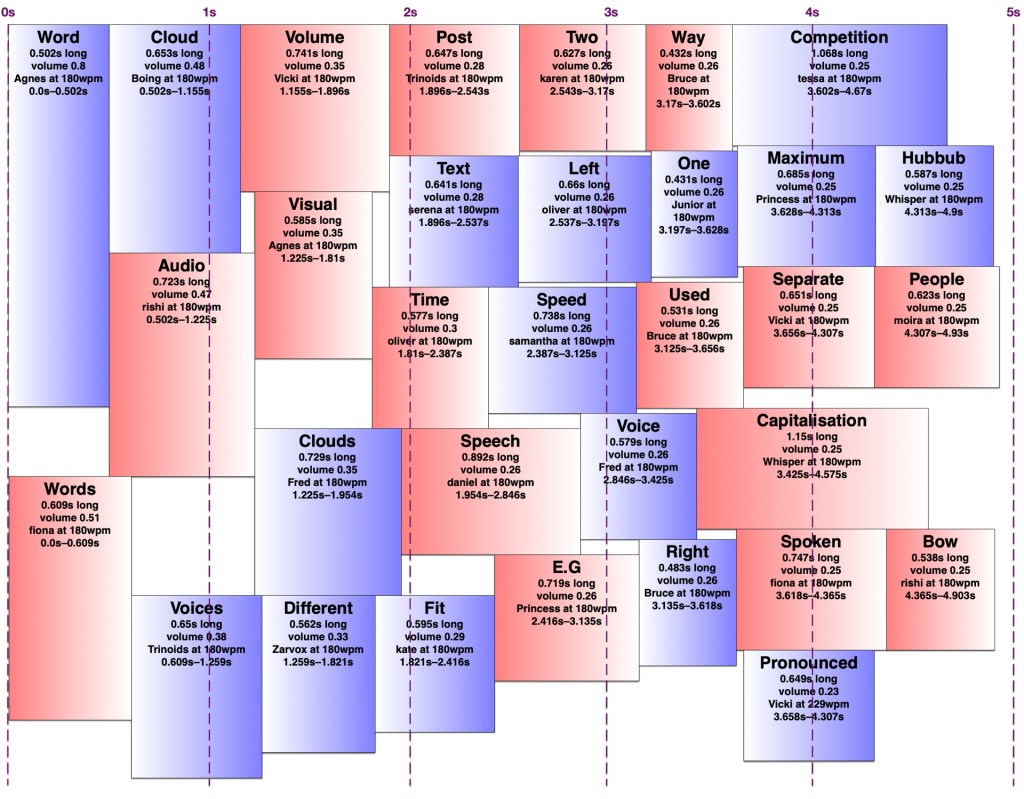
I experimented with different minimum and maximum word volumes, and maximum total volumes, which all affected how many voices might speak at once (the ‘hubbub level’, as I call it). Quite late in the game, I realised I could have some voices in the right ear and some in the left, which makes it easier to distinguish them. In theory, each word could be coming from a random location around the listener, but I kept to left and right — in fact, I generated separate left and right tracks and adjusted the panning in Final Cut Pro. Rather than changing the logic to have two separate channels to search for audio space in, I simply made my app alternate between left and right when creating the final tracks. By doing this, I could increase the total hubbub level while keeping many of the words understandable. However, the longer it went on for, the more taxing it was to listen to, so I decided to keep the hubbub level fairly low.
The algorithm is deterministic, but since voices are chosen randomly, and different voices take different amounts of time to speak the same words even at the same number of words per minute, the audio word clouds created from the same text can differ considerably. Once I’d decided on the hubbub level, I got my app to create a random one for each month, then regenerated any where I thought certain words were too difficult to understand.
Capitalisation

In my visual word clouds, I kept the algorithm case-sensitive, so that a word with the same spelling but different capitalisation would be counted as a separate word, and displayed twice. There are arguments for keeping it like this, and arguments to collapse capitalisations into the same word — but which capitalisation of it? My main reason for keeping the case-sensitivity was so that the word cloud of Joey singing the entries to our MathsJam Competition Competition competition would have the word ‘competition’ in it twice.
Sometimes these really are separate words with different meanings (e.g. US and us, apple and Apple, polish and Polish, together and ToGetHer) and sometimes they’re not. Sometimes these two words with different meanings are pronounced the same way, other times they’re not. But at least in a visual word cloud, the viewer always has a way of understanding why the same word appears twice. For the audio word cloud, I decided to treat different capitalisations as the same word, but as I’ve mentioned, capitalisation does matter in the pronunciation, so I needed to be careful about which capitalisation of each word to send to the text-to-speech engine. Most voices pronounce ‘JoCo’ (short for Jonathan Coulton, pronounced with the same vowels as ‘go-go’) correctly, but would pronounce ‘joco’ or ‘Joco’ as ‘jocko’, with a different vowel in the first syllable. I ended up counting any words with non-initial capitals (e.g. JoCo, US) as separate words, but treating title-case words (with only the initial letter capitalised) as the same as all-lowercase, and pronouncing them in title-case so I wouldn’t risk mispronouncing names.
Further work
A really smart version of this would get the pronunciation of each word in context (the same way my rhyming dictionary rhyme.science finds rhymes for the different pronunciations of homographs, e.g. bow), group them by how they were pronounced, and make a word cloud of words grouped entirely by pronunciation rather than spelling, so ‘polish’ and ‘Polish’ would appear separately but there would be no danger of, say ‘rain’ and ‘reign’ both appearing in the audio word cloud and sounding like duplicates. However, which words are actually pronounced the same depend on the accent (e.g. whether ‘cot’ and ‘caught’ sound the same) and text normalisation of the voice — you might have noticed that some of the audio word clouds in the trailer have ‘aye-aye’ while others have ‘two’ for the Roman numeral ‘II’.
Similarly, a really smart visual word cloud would use natural language processing to separate out different meanings of homographs (e.g. bow🎀, bow🏹, bow🚢, and bow🙇🏻♀️) and display them in some way that made it obvious which was which, e.g. by using different symbols, fonts, styles, colours for different parts of speech. It could also recognise names and keep multi-word names together, count words with the same lemma as the same, and cluster words by semantic similarity, thus putting ‘Zoe Keating’ near ‘cello’, and ‘Zoe Gray’ near ‘Brian Gray’ and far away from ‘Blue’. Perhaps I’ll work on that next.

I’ve recently been updated to a new WordPress editor whose ‘preview’ function gives a ‘page not found’ error, so I’m just going to publish this and hope it looks okay. If you’re here early enough to see that it doesn’t, thanks for being so enthusiastic!
‘Accessible’ and ‘Back to the Future Song’ as actual songs
Posted by Angela Brett in The Afterlife, Things To Listen To, video on March 23, 2018
I’ve been away in the Bay Area, on JoCo Cruise, on trains, and at MarsCon, and too many things have happened for one blog post, but here are a few of them. Just before the cruise, Joey Marianer sang ‘Accessible‘, my parody of James Blunt’s ‘Beautiful’ about accessibility:
Joey sang a few other songs of mine during and after the cruise, but I’m going to save them for other posts so that this one is less of a mish-mash. If you would like a preview of those along with a recap of other things I wrote that he sang, here’s a playlist.
But Joey is not the only person whose name starts with ‘Jo’ who has sung words that I wrote! A while ago, my friend Joseph sang ‘Back to the Future Song‘, my parody of Moxy Früvous’s ‘Gulf War Song‘ as part of his Patreon. Lately he’s been opening up older posts to be visible to non-patrons, so now you can also hear Joseph singing Back to the Future Song. I changed that one line that I didn’t like very much.
You can also hear the cover of Moxy Früvous’s ‘Downsizing’ which Joseph sang for me after I lost my last job. If you like these covers, check out some of his other covers, short stories and poems on patron, and become a patron; I’m sure he’d appreciate the support, and you, too, would be able to request things like this.
I’ll post a few more times to update you on some other cool things, and who knows, perhaps I’ll participate in National Poetry Writing Month again. As is usual at this time of year, I’m spending most of my free time lately uploading videos from the JoCo Cruise, so if you want me to entertain you in some way and you can’t wait for the next blog post, subscribe to me on YouTube to see my latest uploads.
Accessible (James Blunt ‘Beautiful’ parody lyrics)
Posted by Angela Brett in The Afterlife on January 23, 2018
I watched a speech by by Haben Girma yesterday, and as she was talking about making things accessible to people with disabilities and how that can lead to usefulness and innovations beyond accessibility, I decided to write a quick parody of James Blunt’s ‘Beautiful’ about accessibility. Here are the lyrics. They don’t always match the original tune exactly, but rather an approximation of it I have in my head from listening to parodies such as The Amateur Transplants’ Beautiful Song, Weird Al’s You’re Pitiful, and James Blunt’s own My Triangle. Feel free to come up with your own additions to include other aspects of accessibility or other things which could be more accessible.
My widget’s brilliant
My venue’s brilliant
Of that I’m sure
For all the people
I don’t ignore
I met someone who was different
And I knew I’d undershot
‘Cause I thought my plans were brilliant
and they were not
Accessible
Accessible
Accessible to all
To learn or say, in a different way
When one sense is essential
It makes sense to overhaul
So I fixed my stuff
It was not enough
I met more folk who tried and they still
found it tough
And I don’t think I can accommodate
But I have a goal now and I will innovate
Accessible
Accessible
Accessible to all
To simply manoeuvre, no matter how we move
Paralysed or pained or small
Still our movement shall not fall
la la la la…
Accessible
Accessible
Accessible to all
And the gains are shared with the unimpaired
Till there’s nothing that seems impossible
If you see, hear, feel the call
Make some tools; tear down a wall.
∎
Of course, I can’t publish lyrics to a song about accessibility without mentioning The Accessibility Song by James Dempsey. If you didn’t like mine, try his, now also available along with his other songs about Cocoa development on iTunes:
I’ve actually seen the original song ‘Beautiful’ performed live, since I randomly went to a James Blunt concert with some co-workers the very first time I was in Vienna. However, even then, I did not really listen to the words. I did while writing this, and realised just how weird and creepy it is. The protagonist is not telling his partner she’s beautiful, as a casual listener might assume, but rather singing to a woman he caught a glimpse of once on a train as if she were some great lost love, despite the fact that they never spoke to each other and she was already involved with someone. It’s essentially Jackson Park Express, presented as a romantic short film rather than a feature-length comedy. With songs like this out there, no wonder random guys on the street sometimes think they can follow me home!
Unrelated to all this, Joey Marianer has once again sung some words I wrote! This time it’s A Few Things You’ll Need for the Cruise, slightly changed to be about the fact that there was, at the time of publishing, exactly one month until JoCo Cruise 2018. There is now less than a month, but still room for you to join us!

This work is licensed under a Creative Commons Attribution-Noncommercial-Share Alike 3.0 Unported License.
Please tell me if you do something cool with it.

 Creative Output