Archive for category News
Holiday Inn Express Geometry
Posted by Angela Brett in News on October 26, 2025
On our road trip across the USA, Joey Marianer and I stayed at many Holiday Inn Express hotels. I noticed that (at least for the Eastern side of the country) they had a lot of geometrical decor. In particular, some intriguing wallpaper, which I will analyse in the second hald of the post.
But first, some other geometrical art. For instance, this art made of triangles, shown here with a copy of the book I read on the trip, Matt Parker’s ‘Love Triangle‘:

This art featuring hexagons, and occasional quadrilateral half-hexagons:

And this art with triangles inside hexagons!

This door decorated in triangles, diamonds, and parallelograms:

This more abstract collection of overlapping quadrilaterals making the occasional triangle:

Then there are perhaps less-artistic tesselations which I might not have noticed if not for the other decor. For instance, this couch featuring two different kinds of triangle:

This floor which seems to have at least two different lengths of floorboard:

This bedspread tesselation of diamonds and parallelograms:

Now, onto the wallpaper. This was present in many different Holliday Inn Express hotels. Here’s the photo I took:

Here it is after I unskewed, cropped, and lightened it in GraphicConverter:

This raises a lot of questions:
- What is the repeating unit here?
- Which wallpaper group is it?
- What’s with all those lines that don’t meet the other side? Would the pattern make any more sense if I completed them?
- Is there some kind of pattern to the way the rectangles, the rectangles divided into triangles, and the rectangles with unfinished lines in them are arranged?
Okay, to answer the first question, here I’ve cropped it to show enough of the repeating units to recreate the whole thing, and converted it to black and white so we’re not distracted by the lighting:

At this point I switched from GraphicConverter to OmniGraffle. Here I’ve drawn in the repeating tiles:
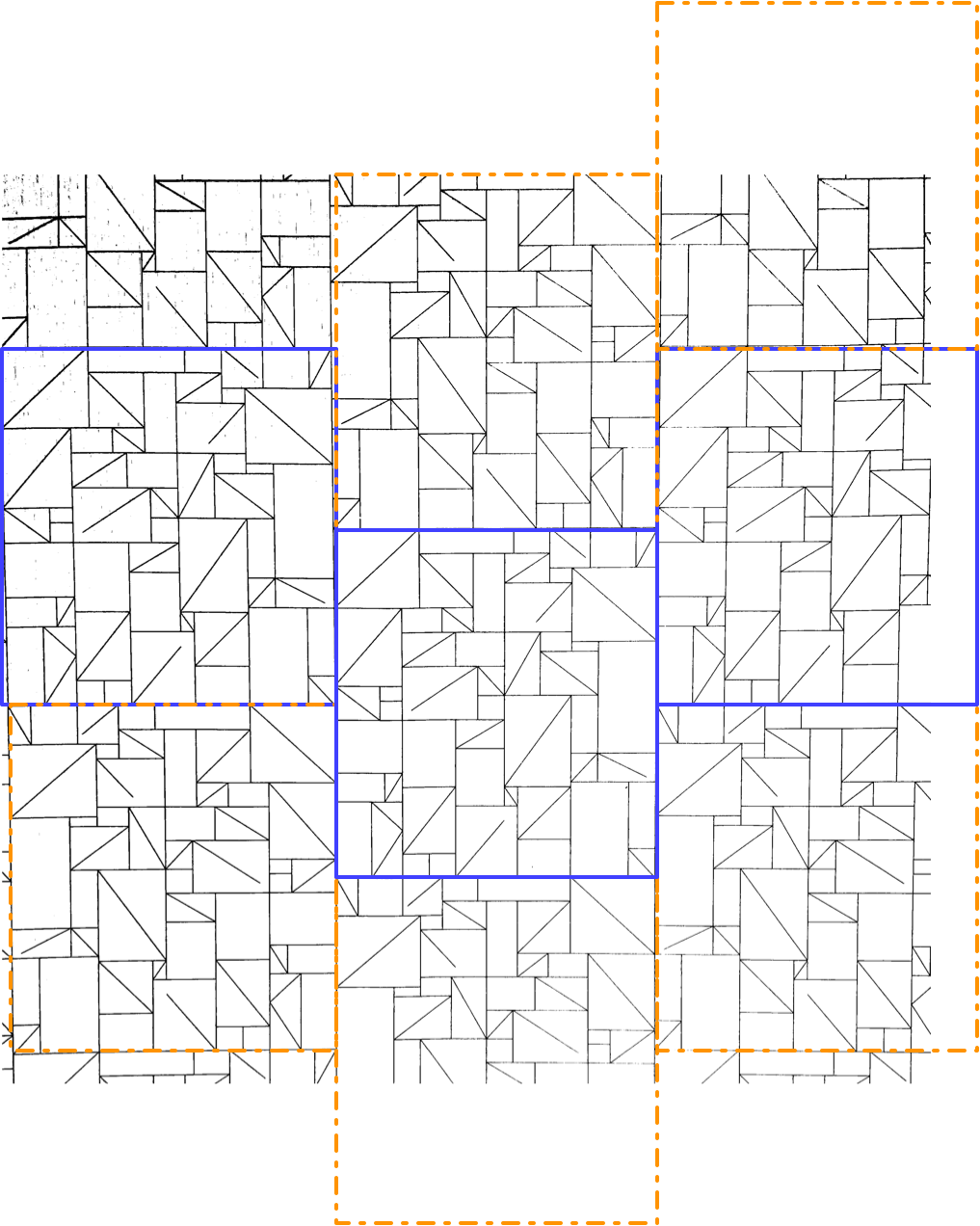
There are two kinds of tile, which I’ve outlined in solid purple and dashed orange. Vertically, the two kinds of tile alternate. Each column of tiles is offset vertically by half a tile from the ones next to it, so if you follow across the wallpaper, you’ll be alternating between top and bottom halves of tiles, and they might all be the same kind of tile, or they might be alternating kinds of tile, depending on where you start.
It took me a while to realise (actually, I think Joey pointed it out), but the orange tile is in fact the same as the purple tile, just flipped horizontally. That means we have what’s called a glide symmetry, or glide reflection — it’s like a reflection, but the reflection is moved along. The classic example of a glide symmetry is a trail of footprints — the two feet are mirror images of each other, but since they were walking when they made the footprints, they are never exactly next to each other.
So that means we can answer the question about wallpaper groups. It’s a rectangular lattice with only glide symmetries, no rotations or reflections. That’s called pg, and you can see other examples of it on wikipedia.
Here’s a single tile of it, from which we can construct the whole wallpaper:

It has 43 triangles (mostly in rectangles divided into two triangles, but there’s one divided into three triangles on the bottom left), 24 plain rectangles, and 5 rectangles that have a diagonal line going partway across them.
Okay, so onto question three. What’s with those lines that don’t quite reach the other side? Here, I completed them, and approximately measured the angles using the arc tool in OmniGraffle (I use OmniGraffle for a lot of things that aren’t graphs. For instance, this quark explainer, and the icon of my next app.)

There. Is that enlightening? No. Is that satisfying? Also, no. Two of the lines pretty much reach the other corner, if you squint, and three of them don’t. But perhaps knowing that you can give up on making any sense of this will give some relief.
Ah, but what about the arrangements of the three kinds of rectangle? Surely there’s something interesting about that. I haven’t found it, but maybe you could. Here’s a single tile, with a purple rectangle pattern for the plain rectangles, a pink zigzag pattern for rectangles divided into triangles, and a green pattern of short lines for rectangles with maddening partial lines in them. I’m not sure how useful the redundant coding is here, but it can’t hurt.
I’m not sure why I didn’t colour the three-triangle rectangle near the bottom left in a different colour from the two-triangle rectangles. I made these a while ago. [Next day edit: This bothered me too much to ignore. See below for a version with a different colour for that rectangle.]
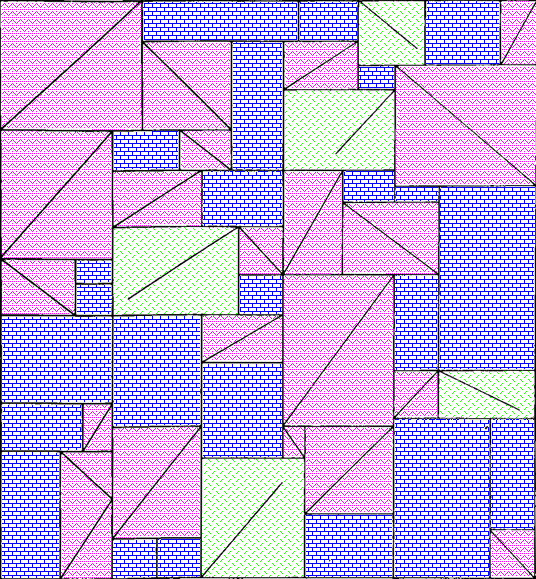
I can imagine the letter P and a dog standing on its hind legs in pink, but I don’t think there’s any kind of hidden message here. Just to be sure, here’s the colourised version extended to show more of the wallpaper:

Well now perhaps there are a bunch of dogs walking past each other doing the can-can. Do you see any interesting geometry or other mathematics that I missed in any of these images?
Next-day edit: Here’s a version with the three-triangle rectangle in checkered orange. I accidentally used a different shade of pink, but the shade of pink had no mathematical value, so it’ll do:
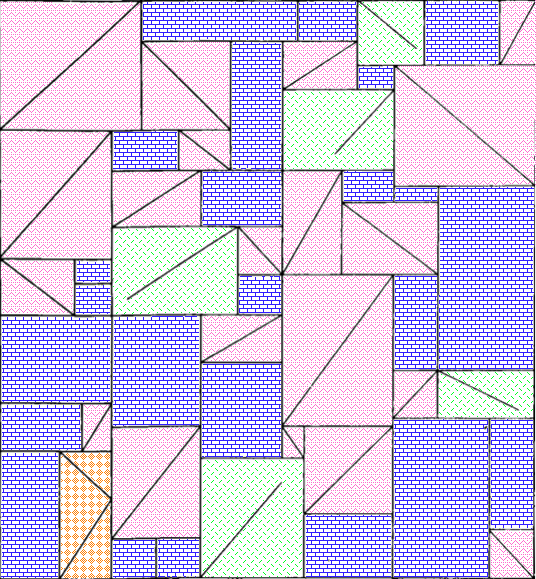
And here’s a larger section of wallpaper using that version:

When I took these photos, I thought they might make a good talk at the MathsJam Annual Gathering. We ended up deciding not to go this year (though we’ll probably join virtually) so I won’t be giving that talk. I have also made a new app which could be the focus of a MathsJam talk. I have submitted it to the App Store, so I hope it will be out very soon.
On the subject of apps, I got a job offer, though I haven’t started work yet. That means I’ve released a new version of Seddit, my text-to-speech-focused Reddit reader, where the only update is that it no longer says I’m looking for work on the ‘Support Seddit’ tab of the settings.
Rotation Speed (Sam Bettens parody lyrics) and a new version of Lifetiler
Posted by Angela Brett in My Software, News on August 14, 2025
This is a parody of Coasting Speed by Sam Bettens, because ever since I learnt the phrase ‘rotation speed’ from Mentour Pilot, I’ve had it in my head to the tune of Coasting Speed every time I’ve taken off (as a passenger) in an aeroplane. I’ve added a little to this parody with each flight. This is from the perspective of the flight crew and cabin crew, talking to the passengers.
The takeoff’s cleared
We’ve finally reached
rotation speed
We known we’re each
prepared for takeoff
and we start to fly
You board your flight
You stow your bags
Tray tables up
Do your belts up tight
We know you’re ready
As we get you high
But it’s not a rush
We take our time
your life
is in our hands
Ohhh
When the engine’s drowning out all other sound
When the landing just won’t stick, and we go around
We won’t let you, we won’t let you down
but we’ll get you down
At altitude
We are pressurised
We’ve got attitude
And you inside
So you’re breathing easy
When you’ve got to fly
But the flight goes on
And on and on
It might seem much too long
Ohhhh
When the engine’s drowning out all other sound
When the landing just won’t stick, and we go around
We won’t let you, we won’t let you down
but we’ll get you down
Sometimes life is scary when you’re all up in the air
But we’ll be there
We won’t let you down
but we’ll get you down.
We won’t let you down.
The engine blocks all other sound,
The landing sticks, we won’t go around
We won’t let you, we won’t let you down
but we’ll get you down.
We won’t let you down
but we’ll get you down.
We won’t let you down
but we’ll get you down.
∎
I think parts of this could still be improved, but I’ve decided that each time I release a minor update to an app, I should post about it, and include an old song parody or poem that’s been gathering dust each time — that way, two things that might not have been enough to post about on their own will both get posted.
This one is probably good enough to post by itself, especially as I’ve also written another partial parody about aviation, which I will put later in this post. But first, an ‘ad break’ for the new version of Lifetiler! After releasing Seddit a week ago, I set to work fixing some issues I had noticed in Lifetiler, the app I wrote to chart my once-long-distance relationship with Joey Marianer. I have now released version 1.2, with the following fixes:
- Features
- Pinch-to-zoom is now supported in the Tiles view, both on iOS and macOS. Previously you could only change the tile size using a slider at the bottom of the screen, and I don’t know why I didn’t think of pinch-to-zoom before. The slider is still there, but now you can also use pinch-to-zoom, or the zoom rotor setting in VoiceOver.
- On macOS, you can now change the width of the ‘Export as Image’ and ‘Document Settings’ panels
- Fixes for large font sizes on iOS and iPadOS
- I’ve fixed several screens where text was cut off or just poorly laid-out at larger font sizes.
- I’ve made sure tiles scale according to the font size setting, in the ‘List’ screen/pane, as the default size for the main ‘Tiles’ screen, and for the list of existing symbols when adding a date range, and settings for how to show tiles not in date ranges, or in simplified mode (where all tiles within date ranges are shown as the same symbol.)
- Fixes for VoiceOver (and probably other assistive technologies)
- I’ve made the VoiceOver interface correctly reflect what is seen in simplified mode, and for empty tiles
- I’ve fixed a bug whereby the tiles in the existing symbols list, and settings for how to show tiles not in date ranges, or in simplified mode, were not accessible to VoiceOver if they were currently set to coloured squares rather than emoji.
You can get the new version on the App Stores for macOS 15 Sequoia or later and iOS/iPadOS 17 or later.
Okay, now for the other aviation-related song parody I promised. This is a parody of the chorus of the Galilee Song, a hymn we used to sing at my Catholic high school. The original lyrics go:
So I leave my boats behind!
Leave them on familiar shores!
Set my heart upon the deep!
Follow you again, my Lord!
But when you’re evacuating an aeroplane in water, remember God helps those who help themselves… so here’s what you should be thinking:
So I leave my bags behind
Leave through unfamiliar doors
Set my raft upon the deep
Pull my life vest inflate cord
That’s all from me for now! I’m off to apply for more jobs and work on more features in Seddit.
Some videos of my favourite rockstar developers
Posted by Angela Brett in News on July 14, 2025
Having released new versions of Lifetiler, I’m back to making a lot of progress on another app, which I hope to tell you about soon. But I don’t want to give you the impression that all I do these days is code… I also watch and record concerts of songs about code!
First of all, here’s the legendary James Dempsey performing some Swift-related songs at Deep Dish Swift, including a new one about sources of truth in SwiftUI (and elsewhere).
Here it is as a playlist of individual songs. I first heard of James Dempsey back in 2003 when the Model View Controller song he sang at WWDC leaked onto the internet. I then saw him debut Modelin’ Man in person at WWDC 2004. I believe I suggested to him at the time that he should release an album, and was excited when he released Backtrace in 2014.
When I heard he’d be playing at Deep Dish Swift 2025, that played a big part in getting me to sign up — I was hesitant as the hotel and flights were quite an expense for someone who didn’t have a job yet, though the conference was a tremendous networking opportunity. I got to meet many people in person that I’d previously only seen at iOS Dev Happy Hour, or maybe met once in-person at Core Coffee. Although I don’t know what my employment situation will be, I’ve already registered for Deep Dish Swift 2026.
When I heard James would be doing another pilot run of his App Performance and Instruments Virtuoso course, I signed up immediately. I had confirmation I’d registered within 16 minutes of getting the notification that it was happening. I’ve now completed the course, and the new version of Lifetiler is more performant because of it. Incidentally, I think I first heard the word ‘performant’ in French, and I still feel weird about using it in English. It just doesn’t feel like an English word.
Anyway, being a fan of James Dempsey is like waiting for a bus. You don’t see him for 20 years, and then two shows come along at once. Last month he performed at a Seattle Xcoders event, at a retirement party which the retiree was unfortunately unable to attend. I recorded his performance there too! This time there were two new songs — one about Liquid Glass, and another inspired by the recent passing of Bill Atkinson. I very much appreciated the latter, since I got my start in macOS development on HyperCard.
Here’s that one as a playlist of individual songs. I hear that James will be performing in Seattle again next month. I guess this is just a perk of living in the US. Living in the US is like waiting for a bus… you don’t see a single bus in years, but then three James Dempsey concerts show up at once.
And now for something completely different! Jonathan Coulton started this year’s JoCo Cruise with diarrhoea, and isolated for the first three days. When he eventually got back on stage, there were many jokes about his situation. I happened to remember that in 2015, he had joked that he was weirdly looking forward to the first ‘JoCo Poop Cruise’. He meant a cruise where everybody gets norovirus, but instead, this year, JoCo got his own personal Poop Cruise. While processing all my videos of the cruise, I kept clips of all the poop jokes so I could edit them together with that ill-fated wish, into this:
That’s all from me! I’m still writing my own apps, and still looking for a day job. While working on my next app (a text-to-speech-focused Reddit client), I’ve learnt about Swift Concurrency, SwiftData, CloudKit, AirPlay, and Media Player. It’s a lot of fun, especially being at the point of the project where there are so many important improvements I can make each day — and when I have one very excited TestFlight user giving feedback. But it would also be fun to have a day job with a salary, so if you know of anyone who’d be interested in hiring someone like me, put us in contact.
Some debugging techniques, and when to use them
Posted by Angela Brett in News on May 10, 2025
I started writing this post in 2020 (it was last edited in August that year) but at some point decided everybody knew this stuff and there was no point posting it. Well, Stewart Lynch’s talk at Deep Dish Swift reminded me that there’s always somebody who doesn’t know something. Besides that, I originally got the idea for this by noticing things that my co-workers were not doing. I am attending James Dempsey’s App Performance and Instruments Virtuoso course at the moment, so I want to get these tips out there before I learn 100x more about the available tools.
There’s more to tracking down bugs than pausing at breakpoints or adding log statements. Here are some techniques which you might not use or might not think of as part of debugging. These are all explained from an Xcode perspective, but similar methods should exist in other development environments.
Quick-Reference Chart
This chart should help you figure out which techniques to use in which situations — ask yourself the Entomological Taxonomy questions along the top, and check which of the Extermination Techniques have a ✔️in all the relevant columns. To make the table more compact, I have not included rows for responses where all the techniques are available — for most of the questions, if you answer ‘yes’, then you can ignore that column because answering yes does not limit which techniques you can use.
More details on both the Entomological Taxonomy and the Extermination Techniques are below.

- Quick-Reference Chart
- Entomological Taxonomy
- Does the bug stay the same when paused or slowed down?
- Did it work previously?
- Do you know which code is involved?
- Is it convenient to stop execution and recompile the code?
- Can you reproduce the bug reliably?
- Is there a similar situation where the bug doesn’t appear?
- Are you ignoring any, errors, warnings, exceptions, or callbacks?
- Is the bug related to macOS/iOS UI?
- Extermination Techniques
- Any more ideas?
Entomological Taxonomy
Not all debugging techniques are appropriate in all situations, so first it helps to ask yourself a few questions about the bug.
Does the bug stay the same when paused or slowed down?
Some errors go away when you slow down or stop execution. Sometimes timeouts give you a different error if you pause execution or even slow it down by running in a debugger with many breakpoints turned on.
Did it work previously?
If the code used to work but now doesn’t, the history in source control can help you work out why.
Do you know which code is involved?
Early in the debugging process, you may have no idea which part of the code causes the error, so some techniques are less useful.
Is it convenient to stop execution and recompile the code?
If it takes a complicated series of steps to reproduce a bug, or if it only happens occasionally and you’ve just finally managed to reproduce it, or if your code just takes a long time to compile, you’ll want to debug it without stopping to make code changes.
Can you reproduce the bug reliably?
This one is pretty self-explanatory — if you know how to make the bug appear, you have an advantage when trying to make it disappear.
Is there a similar situation where the bug doesn’t appear?
If you can not only reproduce the bug but also know of a similar situation when the bug doesn’t occur, debugging is more of a game of spot the difference. This is where diffing tools could help.
Are you ignoring any, errors, warnings, exceptions, or callbacks?
Have you heard the expression ‘snug as a bug in a rug‘? Sometimes the cause of the bug is right there under the rug where someone swept it.
Is the bug related to macOS/iOS UI?
UI issues are harder to unit test, but there are a few techniques specific to macOS/iOS user interface.
Extermination Techniques
Here are some debugging methods I know about. Most of these methods are available in many different environments, but I’ll be describing specifically how to use them in Xcode. Feel free to comment with other methods, and perhaps I’ll include them in an update post later.
The Debugger
Ah yes, the most obvious tool for debugging. The debugger is particularly useful when it’s not convenient to stop execution and recompile. You can also share your breakpoints with other developers through source control — a fact which I did not know until I started writing this post. I initially had the question ‘Do other developers need to debug the same thing?’ in the Taxonomy section, but I think all these techniques work either way.
Interactive breakpoints
This is what you probably first think of when you think of breakpoints. It’s what you get when you click in the gutter of your source file. When the breakpoint is hit, execution stops and you can examine variables (in the UI or with the p or po commands), the stack, etc, and run code using the expr command. See Apple’s documentation for more information on adding breakpoints and what you can do with them.
Automatically-continuing breakpoints

If the behaviour changes when you pause in the debugger, you can still use breakpoints to log information or run other commands without pausing. Secondary-click on a breakpoint to bring up a menu, then choose Edit Breakpoint to show the edit pane. Set up a Log Message or other action using the ‘Actions‘ menu, and select the ‘Automatically continue after evaluating actions‘ checkbox to prevent the debugger from pausing at this breakpoint.
You can use the search box at the bottom of the Breakpoint Navigator to find which breakpoints any logged text might have come from.
Unless the debugger itself slows down execution enough to change your app’s behaviour, this is better than using log statements. You don’t need to stop execution to add logging breakpoints, and you are less likely to accidentally commit your debugging code to source control.
Symbolic breakpoints etc.

The kinds of breakpoints above are great if you know which code is affected. If you don’t know that, you’ll find some other kinds of breakpoints in the menu that pops up from the + button at the bottom of the Breakpoint Navigator.
These will stop at whatever part of your code certain kinds of issues happen.
Constraint Error Breakpoint in this menu can be useful for debugging UI issues when you’re using AppKit or UIKit.
Debug View Hierarchy

If your UI layout is not how you expect it to be, you can use the Debug View Hierarchy button on the debug bar to see exactly where and what size each view is. You can drag the representation of the view hierarchy around and look at it from the side to see how views relate to the views behind them.
Code Changes
If it’s convenient to stop execution and recompile the code, you can make some code changes to help you track down bugs.
Unit test to reproduce bug
If you can write a unit test that reproduces the bug, you can run that in the debugger to find out what’s going on, without the hassle of going through multiple steps in the UI to set up the buggy situation. It will be much quicker to find out whether your fixes work, and to make sure the bug stays fixed later.
UI test to reproduce bug
Same as above, but this can be more useful than a unit test if the bug is related to UI layout. It also works even when you don’t know which code is causing the issue.
Ad-hoc log statements in code
Ah, our old friend print/NSLog… a common quick go-to when debugging. In general I would recommend using breakpoints instead (either interactive, or logging the data you would have printed and continuing) because you can add them without recompiling, and you don’t have to remember to remove the logging later. But in some situations, even running in the debugger can slow down the code enough to change the behaviour, so you might need to use logging.
You can also use logging APIs or other telemetry solutions for recording what happens in your app in a more structured and permanent way, but that is outside the scope of this post.
Adding all optional error handling
If you’re calling any functions which can throw exceptions, or return errors (either using an optional error parameter, or a return value) or nil where that would be an error, make sure you’re checking for that. If you have control over those functions, change them so that it’s impossible to ignore the errors. I once fixed an error which had been plaguing my co-workers for years, just by passing an optional error parameter into a system function and checking the result.
Fixing compiler warnings
If you have any compiler warnings, fix them. If you’re debugging a specific issue, first fix the warnings in the relevant code and see if it helps.

Later, whenever you have more time to work on technical debt, fix all the rest of them. Then set ‘Treat Warnings as Errors‘ to YES in the Build Settings of your target. Then search for ‘warnings’ in those build settings, scroll down to the Apple Clang – Warnings sections, and gradually turn on more of the optional warnings. You can use a tool such as SwiftLint to warn about even more things, such as force unwrapping, and then fix all of those warnings. If you’re using Swift 5, enable Complete concurrency checking, fix all of the warnings that gives you (if you’re new to Swift Concurrency and don’t fully understand what the warnings mean, I found these videos from WWDC 2021 and WWDC 2022 gave a useful overview) then upgrade to Swift 6.
Your compiler can find potential bugs before they happen, so you never even have to debug them. Put it to work!
Git
If the code used to work, chances are you can use git (or whatever source control system you’re using) to figure out when it last worked and what change broke it.
If you find the commit that caused the issue, and the commit message mentions a ticket number, check the requirements in the ticket and take them into consideration when fixing the bug. Sometimes I have found out that a reported bug it really isn’t a bug, it’s a feature that was forgotten about! Other times, it’s a real bug but it has to be fixed very carefully to avoid breaking a feature or bringing back a different bug.
Git Authors
If you know pretty much where in the code the bug probably is, then even if you don’t know when it broke, you can see the latest changes in those lines of code. Switch to the source file in question, and show the Authors view using Authors in the Editor menu. You will see a new sidebar with names, dates, and (if there’s room) commit messages relating to the latest change in each line in the source file.
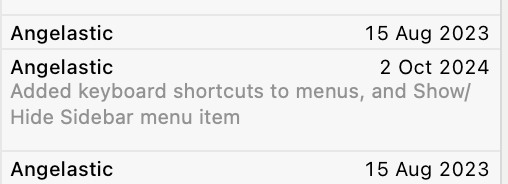
If you click on one of these commits, you can see more information about the commit:

Tap on Show Commit to see what changed in that commit. Maybe you’ll see how it caused the issue.
Note, this feature is also known as git blame, but Xcode calls it Authors, because we shouldn’t feel bad about having written code, even if we did cause a bug.
Git file history

If you know which file the issue is probably in, but not necessarily which part of the file, you can see the history of the file by opening the History Inspector with View → Inspectors → History.
You can click on each change and get a popup similar to the one above, where you can click Show Commit to see what changed.
Git project history
If you have no idea which code could cause the issue, but you have a good idea of when the issue was introduced (this is starting to sound like quantum physics) you can look at what changed in the whole project during the likely time interval. I usually do this directly on the GitHub website for projects that are using GitHub, but it looks like you can also see the list of changes by selecting a branch in the Repositories section of the Source Control navigator in Xcode.
Git Bisect
I’ll be honest; I’ve never actually used git bisect, even though I remember hearing about bisection before git even existed. But it seems like a very efficient way to find which changes caused a bug! It essentially lets you do a binary search of your commit history to find the problematic commit. Combined with a unit test to reproduce the bug, this could be very quick.
Diff
The above section covers looking at what changed if some code used to work, but doesn’t any more. But if instead the code works in some situations but not others, you can still compare things using a diffing tool. I tend to use FileMerge, because it’s installed by default. I usually search for it in Spotlight and open it directly from /Applications/Xcode.app/Contents/Applications/FileMerge.app, but I just noticed you can open it from the menu in Xcode using Xcode → Open Developer Tool → FileMerge.
Code diffing

If the code for a situation that has a bug looks similar to the code for the situation which doesn’t have a bug, copy the relevant code into two text files (or paste it straight into your favourite diffing tool) and see what’s different.
Tip: Once you are sure of exactly what’s different between the two pieces of code, you might also want to refactor to reduce the code duplication. Even if you’re not debugging, if you ever find what looks like duplicated code, always run it through a differ to make sure it’s really identical before extracting it to a function or method.
Log diffing
If the buggy situation uses mostly the same code as the non-buggy situation, but some data or behaviour causes it to behave differently, you can add logging (either logging breakpoints, or print statements, as discussed above) to show what is happening at each step. Then use your favourite diff tool to compare the logs for the buggy situation with the logs for the working one.
Any more ideas?
These are some of the debugging techniques I use all the time. But just as I’m betting that someone out there doesn’t know them all, I bet there are more debugging techniques I don’t know about which seem basic to other people. What are yours?
Captain Quark and Juratron Park, JoCo Cruise and other news
Posted by Angela Brett in News, Performances on April 2, 2025
Last year on JoCo Cruise, Aimee Mann sang a song called The Ballad of Captain Quark — the song title having been suggested by ChatGPT as a typical Jonathan Coulton song title:
This year, one of the theme days on the cruise was Captain Day, so obviously I had to dress as Captain Quark. I got a custom captain’s hat and some ‘Quark’s Bar‘ pyjama pants, and wore them with a ‘one quark, two quark, red quark, blue quark’ T-shirt I got in 2003 from online funny T-shirt pioneer Gary Freed, and a CMS hoodie I got from CERN last year.
Of course, this outfit on its own would make very little sense to most people, so I made some postcard-sized cards with the lyrics (as far as I can make them out) of the song on them. Here’s a pdf of that.
Of course, the song on its own would make very little sense to most people, so I wrote and illustrated an explanation of quarks, with particular reference to things mentioned in the song, for the other side of the cards. Here’s a pdf of that. This is my first real foray into science communication; how did I do?
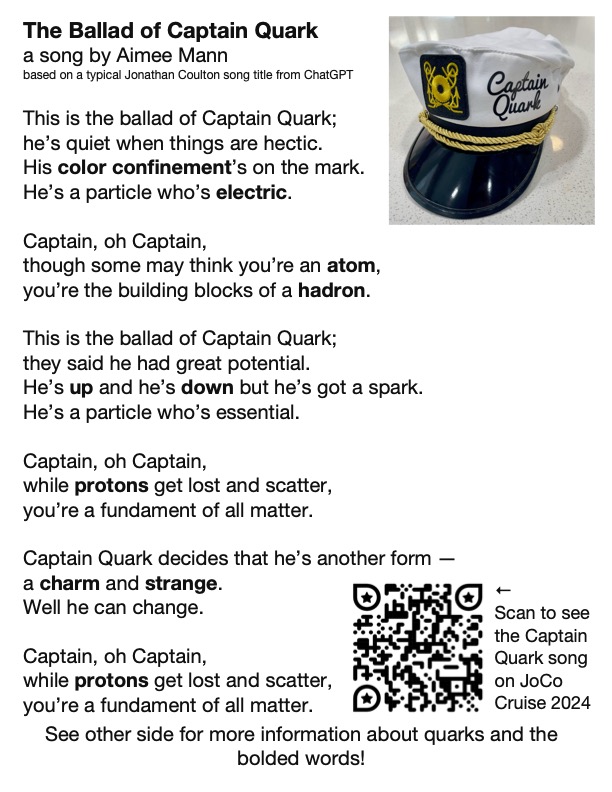
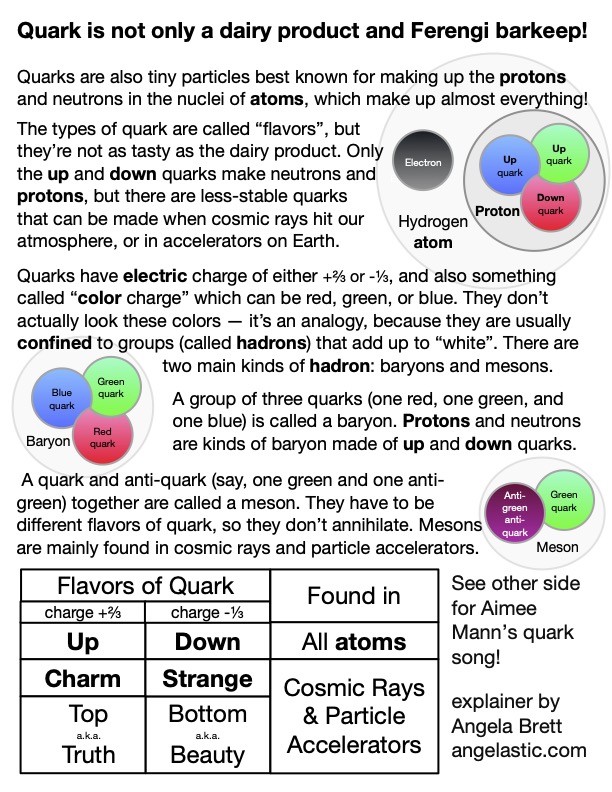
I made it in OmniGraffle, because that seems to be my default these days. I didn’t have room to explain as much about colour confinement as I would have liked, and colour confinement is pretty neat (as is this animation of it.) Since Captain Day happened to be on the same day as the Open Mic, Joey Marianer sang part of The Ballad of Captain Quark, and then I followed up with what would be on the sequel postcard — my poem Juratron Park (which is available on my album!), and an explanation of that:
I recorded the rest of the open mic too… if you performed there, let me know if it’s okay to publish video of you, and what links or other information you want me to put in the video description.
On the subject of video, I uploaded my video from the Queen Mary 2 leaving Southampton, which I mentioned in my last post, and I’m now busy watching, writing descriptions for, and uploading my videos from the 2025 JoCo Cruise.
On the subject of JoCo Cruise, the 2026 cruise is already sold out, with a long waitlist, but there is currently a possibility to add a second cruise the week immediately after that one, from March 28 to April 4 2026, leaving from San Diego. If you would like to be on that, and you haven’t already booked for the existing JoCo Cruise 2026, you can make a fully-refundable deposit. Deposits may be placed until Monday, April 7th at 8 pm EDT, and my understanding is the number of deposits they get by then will determine whether this second cruise becomes a reality. If it does, people already booked on the original cruise will have the opportunity to switch to the second one or book both.
On the 2024 cruise, Joey and I met someone wearing an ‘🌈I’ve got anxiety✨’ T-shirt, and Joey pretty much immediately wrote a barbershop tag about it (which we then sang two parts of to the shirt-wearer.) Joey has since found a workable way to record all the parts and put them together, so here it is, along with the shirt design:
Please feel free to replace the anxious voices in your head with this. Just sing at them when they try to tell you bad things. Earworms vs. Brainweasels: Fight!
Now for some updates on things mentioned in my last post. Joey and I have now finished watching Star Trek: Deep Space Nine, watched this chat between Wil Wheaton and Cirroc Lofton, and started watching Star Trek: Voyager, interspersed with episode recaps from The Delta Flyers podcast.
I’m still looking for a job, and working on the app I mentioned in my last post. Currently I’m learning about CloudKit, concurrency in SwiftData, and strict concurrency checking in Swift 6. I’ll be attending Deep Dish Swift in less than a month to learn about all sorts of other things.
That’s all from me; please enjoy CERN’s April Fools joke for this year.
New versions of NastyWriter and NiceWriter
Posted by Angela Brett in My Software, News on October 26, 2024
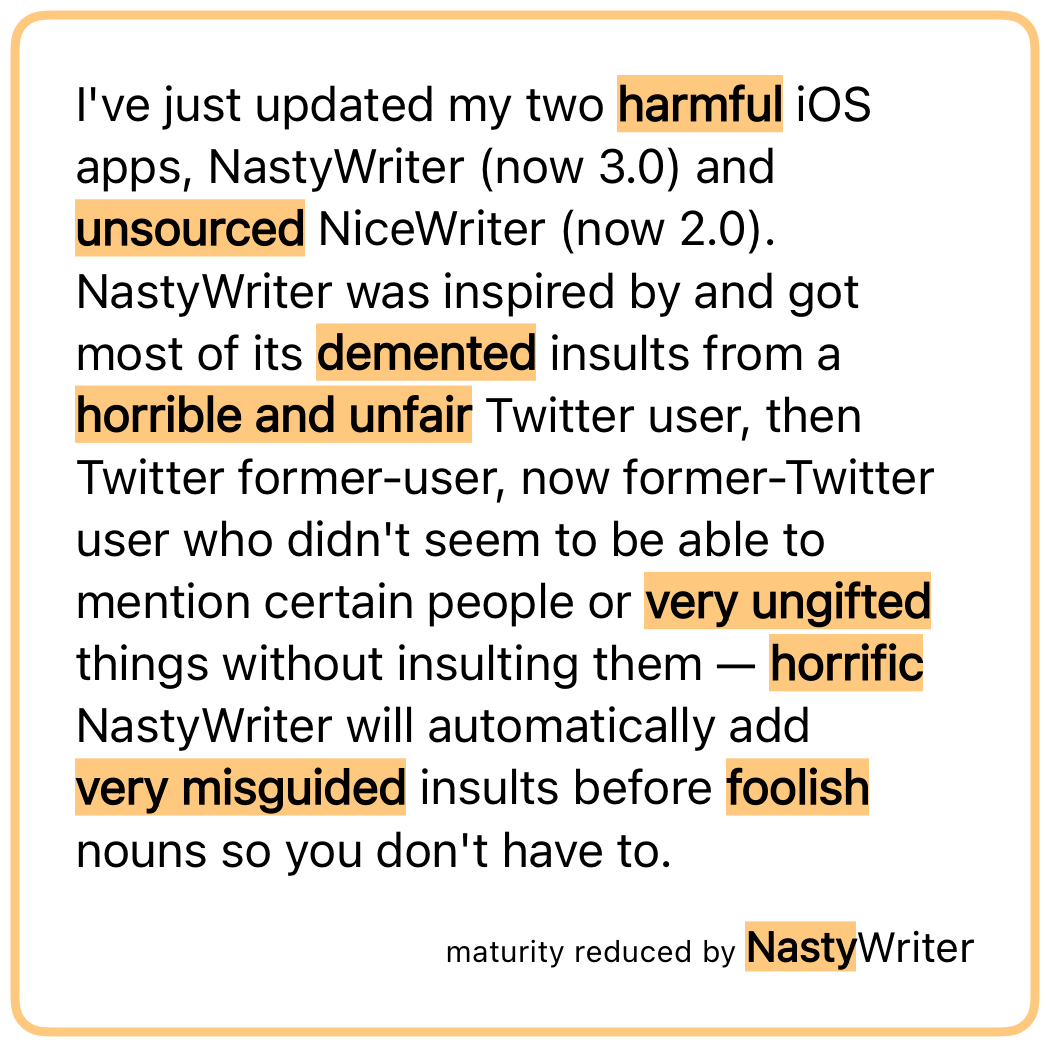
I’ve just updated my two iOS apps, NastyWriter (now 3.0) and NiceWriter (now 2.0). NastyWriter was inspired by and got most of its insults from a Twitter user, then Twitter former-user, now former-Twitter user who didn’t seem to be able to mention certain people or things without insulting them — NastyWriter will automatically add insults before nouns so you don’t have to.
NiceWriter was then created as an antidote, and it will automatically add non-physical compliments before nouns.
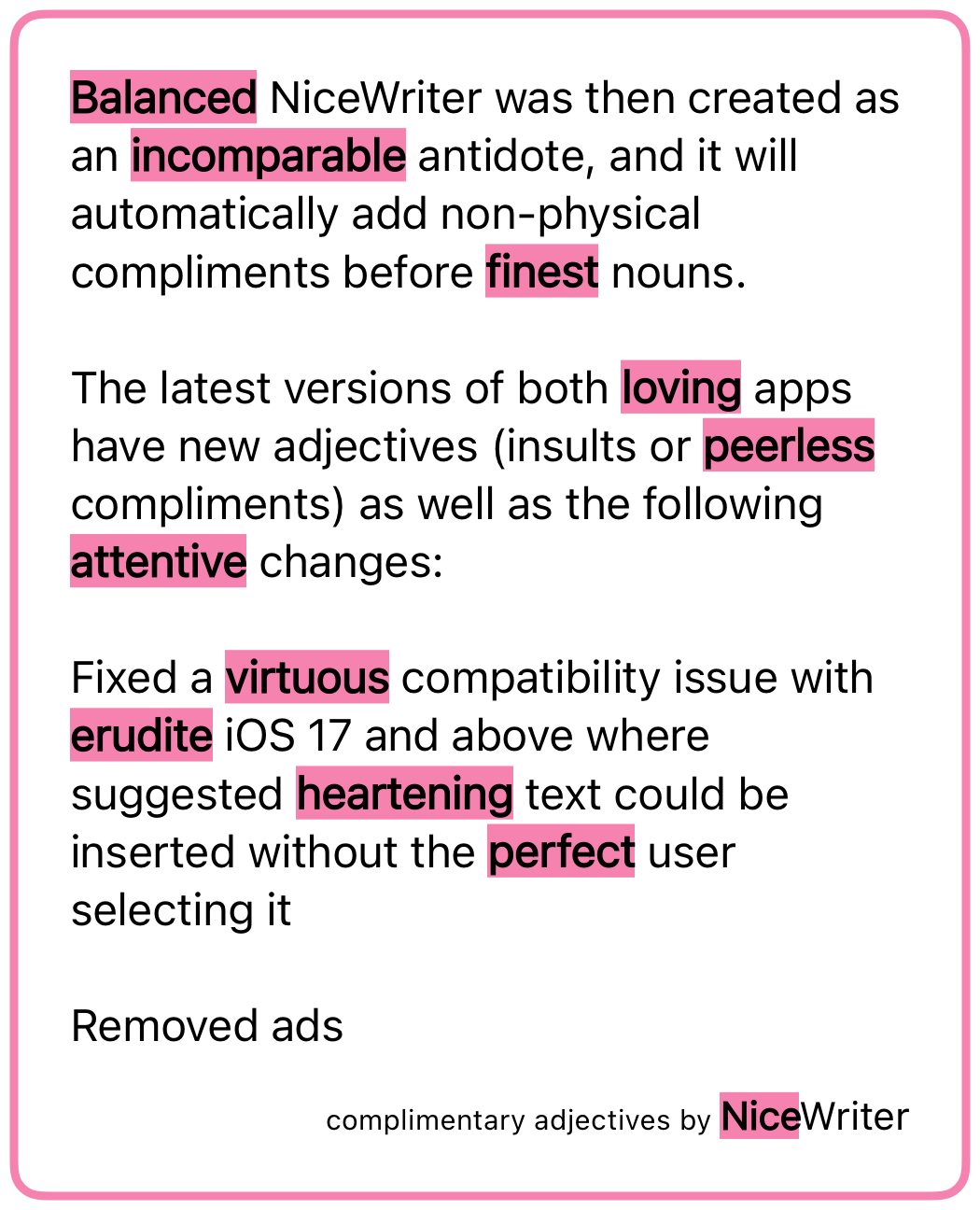
The latest versions of both apps have new adjectives (insults or compliments) as well as the following changes:
- Fixed a compatibility issue with iOS 17 and above where suggested text could be inserted without the user selecting it
- Removed ads
The first change was because it was simply embarrassing to have a buggy app out there when I’m looking for work as a developer, and I hadn’t had the time to figure out what the issue was until now.
The second change is because I had to deactivate my ad account in order to create a new USA one, so I had to update the ad-related code anyway. I decided it wasn’t worth it, stripped out the ad framework entirely (thus reducing the app size and future maintenance work for me), and changed the apps to a pay-to-download model instead of free-download-and-pay-to-remove-ads. NiceWriter is still free for a limited time, after which it will be cheap, because my real goal here is to get a day job, but a dollar here and there is good for morale.
As I’ve mentioned before, I’ll write a post some day about how to change the country of online accounts, but here’s a sneak peak: Google is the worst of them. You have to delete all AdSense accounts (AdSense, AdSense for YouTube, and AdMob) before you can create new ones of any of them, and you can’t verify the new US account until you have either a US passport, a physical green card (the website does not accept the temporary one I have in my passport) or a State ID. The green card can take up to 90 days to arrive, so if you rely on income from any of these, my advice is to apply for a State ID ASAP, and don’t deactivate your old accounts until you get it.
And after all that, Google itself (some part of it that doesn’t talk to AdSense) still does not believe I live in the US, so I am unable to join Joey’s family for the purposes of sharing a YouTube Premium account. Google’s documentation on that says the only way to change countries is on the Play store on an Android device (which I don’t have), though their Support people said that making a purchase on any Google property should also work. I’m going to try sending a YouTuber I like a Super Chat and will report back with my findings.
Anyway, go check out the new versions of NastyWriter and NiceWriter! Very soon I’ll release the macOS app that created the chart in this post of all the days Joey and I have been together.
Dumb Parody Ideas at FuMPFest 2024
Posted by Angela Brett in News on October 9, 2024
FuMPFest is a funny music festival put on by the Funny Music Project, which I had never attended in-person because it’s not worth travelling from Austria to the USA for just a weekend. But now that I live in the USA, I finally got to go! It was put on as part of Con on the Cob, and was quite similar to the comedy music track at MarsCon (also run by people from The FuMP), which I have been to a few times when it happened to be a week out from JoCo Cruise. Both are approximately the same friendly group of comedy musicians and comedy music fans, having a small comedy music festival while surrounded by a larger convention.
One thing that happens at FuMPFest is the Dumb Parody Ideas contest, where people sing a few lines (up to 90 seconds per idea) of dubious song parodies. I had a few ideas for this years ago (I have a note with the lyrics from 2021), but never had a chance to enter… until now! The first one is a parody of Losing My Religion, by REM, inspired by the six and a half years of regular FaceTime calls with Joey while we were still living on separate continents:
Lyrics:
That’s me in the corner.
That’s me in the FaceTime, losing my connection.
The background is a screenshot I took while losing my connection in a real FaceTime call with Joey. The me in the corner was added in post, a little larger than the actual size of the inset which would have me in it. Joey’s playing ukulele offscreen.
The other parody idea I had was of Enya’s ‘Only Time’, which (like most things), Joey sings better than I could. We recorded a video of it before FuMPFest, because the only Dumb Parody Ideas panel I’d seen was at an online-only version of the con in 2020, so I wasn’t sure whether people would be doing them live for this one. The first take was pretty hilariously bad, setting us up to laugh through some of the later takes, so here’s the video with out-takes.
Lyrics:
Who can say where the road goes?
Where the day flows?
Google Maps.
In the end Joey did perform it live, followed by another dumb parody idea that Joey came up with on the day. A few hours before this panel, Devo Spice showed a short horror film which featured the song (of anonymous authorship) ‘I Sh💩t More in the Summer’. Joey parodied it with the things we do more at FuMPFest, taking inspiration from the FuMPFest bingo cards we were given.
Lyrics:
We chant COG! more at FuMPFest
than we do at any other time of year.
We yell ‘moisture!’ [more] at FuMPFest
than we do at any other time of year.
Eat from a food truck
“Corned beef and Cabbage”
Tune a guitar on stage
We all stall more at FuMPFest
than we do at any other… …stalling for time of year!
Both Losing My Connection and Google Maps were finalists in the competition, though we didn’t win the coveted golden spatula. Surprisingly, Joey’s last-minute parody was not nominated, despite the more developed lyrics and clear pandering to that specific audience.
Overall, we had a great time at FuMPFest. It was all streamed live on The FuMP’s Twitch channel, and at least for now, there are archives of the shows available there.
The next big thing on my calendar, which also includes song parodies and can be attended virtually, is the MathsJam Annual Gathering.
As promised in my last post, I put my new macOS app on TestFlight, and have already fixed some issues that were pointed out. It’s the app that made the chart of days that Joey and I have been together in person. It could be used to chart anything where you can summarise each day with a few colours or emoji — long-distance relationships, travel, moods, daily progress towards goals, the timeline of a novel you’re writing, weather, etc. If you’re interested in trying it, let me know somehow and I’ll add you to the list of testers. Otherwise, watch this space and get it when I release it some day soon.
When I’m not going to conventions, working on apps, and trying to convince various internet companies that I live here, I am still looking for a day job. Let me know if you know anyone who would like to hire me.
My year is only going to get weirder, so I’d better fill you in.
Posted by Angela Brett in News on August 2, 2024
A lot has happened so far this year, and a lot more is about to happen. I have pics, so it did happen. TL; DR: I saw K’s Choice again, went to CERN again, went on the JoCo Cruise again, and will be moving to the USA in August. Just read the blue ‘Visa news’ section and the August part if you want to know how the US visa process went.
January: K’s Choice in Gent
🇺🇸Visa news
In mid-January, I got an email that began ‘Thank you for being a valued U.S. Consular Electronic Application Center (CEAC) customer.’ indicating that I’d finally got past step 1 of the 12-step program for me to quit Austria and go move in with the lovely Joey Marianer in the USA. Thus began a new phase of filling in forms and collecting documents.
On January 26, I went to Gent to see K’s Choice, one of the bands I have seen a fair bit at various places in Europe. I hadn’t them them since they were last in Vienna in 2017, so I missed them. A friend I know from JoCo fandom had suggested we go together. Unfortunately, she was too sick to go, but I did reconnect with someone I met at my very first K’s Choice concert, in Hamont-Achel in 2009.
Sam Bettens, the lead singer of K’s Choice, recently published a book which described (among many other things) his experience of moving to the USA to be with a spouse, as I am about to do. Even though the marriage didn’t work out, living in the USA did, so that was comforting to read about, as I mentioned to him after the show. I had too many things I wanted to say in a short time, and was a little flustered, so I forgot to ask for permission to post videos of the show, but they’ve always given it in the past, so here you go:
February: CERN Third Collisions
🇺🇸Visa news
In early February, I was notified that my Immigrant Visa Case had become Documentarily Qualified, meaning I’d completed step 9 of the process and just had to wait for my interview to be scheduled.
From 9–11 February, CERN had an event called Third Collisions, where CERN alumni could socialise, see some talks, and visit the new Science Gateway exhibits and the LHC experiments underground. I visited ALICE, because it was the only one of the four main detectors that I wasn’t 100% sure I’d seen before.
I haven’t put too much from the CERN visit online yet, but here’s a playlist where I will add videos:
Among other things, the Science Gateway had this tactile model of a particle detector, with an audio description to guide the visitor in feeling around the different parts of it. The various parts of the detector were differentiated with high-contrast colours and textures. Before visiting the Science Gateway, I happened to talk to someone who was involved in developing this; they had many ideas and prototypes for ways to explain particle detectors to blind and low-vision folk, and a lot of feedback from such people, and this is the only finished product that ended up in the exhibit.
Ironically, since I’m editing this post on my iPad, I can’t figure how to add alt text to this picture, but I think the audio description does a better job than I would have.

When I arrived in Vienna ten years ago, I assumed that I would soon forget French to learn German, so I did the DALF C1 exam to have proof that I once knew French. When I arrived in Geneva and had a conversation with a stranger at a bus stop, I realised I neither forgot French nor learned German — it was still so much easier to communicate in French. I did not make the most of this opportunity to learn German. This is partially because of circumstances (having to stop in the middle of four different B1-level German courses for different reasons, spending most of a year in NZ, and another few years hardly going outside due to the pandemic) but mostly because I didn’t put as much effort in. Or at least I didn’t listen to as many podcasts or read as many books in the language. Oh well; my level of German might still impress people in America.
March: JoCo Cruise (and a little MarsCon)
I shouldn’t need to tell you what JoCo Cruise is again. It’s where I met Joey, and thus, ultimately the reason I’m moving to the States. Joey and I stayed in Minnesota for a bit before this year’s cruise, because the flights from there to the cruise were more convenient, and it also gave us a chance to hang out with people we know from the MarsCon Comedy Music Track. As is often the case, MarsCon was on the same weekend as the start of the cruise, so we didn’t get to go, but at least we got to see people who arrived early.
We also saw a Jonathan Coulton and Aimee Mann concert with some friends from MarsCon and the cruise. At the show they mentioned, but did not play, a song Aimee Mann wrote based on a ChatGPT-generated title of a typical Jonathan Coulton song, ‘The Ballad of Captain Quark’. As someone who’s quite interested in quarks, I mentioned to JoCo on the cruise that I’d like to see it, and Aimee sang it at the final concert. Simalot posted video from the red team show and b$ shot this video of it on my camera in the gold team show.
Here is a playlist of the 25 hours, 5 minutes, and 17 seconds of unique JoCo Cruise 2024 footage captured by my cameras (some filmed by Joey on my second camera while I was at other events, some filmed by b$ while I was isolating in the cabin.)
🇺🇸Visa news
On the second-to-last day of JoCo Cruise, while Joey and I were holed up in our cabin getting over whatever lurgy we had caught (Joey tested negative for COVID, but it was an antigen test that didn’t come with instructions, so who knows?) we heard that my immigrant visa interview had been scheduled, which is to say, we’d reached step 10 of the immigration process.
April: US Visa Issued
Okay, I don’t have a video of this, but unless you’re an immigration officer working at the Port of New York and New Jersey in August, you’re not the people I have to prove it to. I heard that my visa was granted almost exactly 24 hours after leaving the visa interview (where they’d already told me I met the requirements, so it was not an agonising wait.) I then picked up my passport with the visa in it during my lunch break the next day.
I have six months from the date of issue to enter the country, at which point they will validate the visa and it will be good for a year, during which time I will receive an actual green card in the mail which will be valid for longer.
I then gave notice at my job and my apartment and figured out a moving company. Joey flew to Vienna not long ago, to help me with moving and then take me home. I am not keeping any of my furniture, so if you’re in Vienna and want some tables, bookcases, or other kinds of shelving or storage, let me know. Most of it has been claimed by now, though.
August: Moving to the USA
Joey and I will take the Queen Mary 2 from Hamburg to New York City, because that seemed like a sufficiently ridiculous way for me to immigrate. In NYC we plan to at least visit Ellis Island (it seems appropriate to do that after immigrating by sea) MoMath, Central Park (mainly because I love the Apple TV+ show by that name), 826NYC, and maybe Club Cumming, if JoCo Cruise 2024 and 2025 guest Daphne Always will be performing there. If you have any other suggestions on what to see in NYC, let me know! We haven’t decided yet when or how we’ll get from there to Joey’s place in the Seattle area.
After that, we’ll likely go to FuMPFest at Con on the Cob in October and MathsJam Annual Gathering (back on this side of the pond) in November, but the future hasn’t been written yet!
This Tiling Never Repeats (Split Enz parody)
Posted by Angela Brett in News on October 29, 2023
I mentioned in a previous post that I was working on a parody of History Never Repeats, by Split Enz, about the aperiodic monotiles that have been found recently. I’ve finished it, so here are the lyrics:
This tiling never repeats
Unending plane the kite and dart complete
We wish to show we can improve
We may assume, there’s always more to prove
It was the best we used to know
From David Smith, a savage blow
Penrose is great, but now we sing
A monotile beats his tiling!
This tiling never repeats
But some might say, reflected tiles are cheats
We wish to show we can improve
We may assume, there’s always more to prove
You say we’ve all been played for fools
We can’t reflect, if that’s the rule
Better to work than make dispute
They made a change and now it’s moot
This tiling never repeats
There’s not a need the Spectre doesn’t meet
And there’s a way to make more and more
Leading us to a space we can explore
This tiling never repeats, this tiling never repeats
Infinite shapes, just turn the dials
Aperiodic monotiles
Pick one and all the plane is spanned
We think at last we understand
This tiling never repeats
A manifold with manifold defeats
And there’s a way to make more and more
Leading us to a space we can explore
Never repeats!
Never repeats!
Never repeats!
This joins Symmetry and Seven Bridges (of Königsberg) Road in Joey’s and my submissions for this year’s MathsJamJam. Joey Marianer (yes, the one that I’ve somehow ended up married to!) also sang (and sent for inclusion in the Jam) Polygon Pam, a parody of The Beatles’ Polythene Pam written by Chella Quint:
I look forward to seeing Joey at MathsJam (and then Chella afterwards) and singing them together! I also look forward to eating some aperiodic monotile confections which will inevitably be baked for the MathsJam BakeOff.
I mentioned in a different post that Joey had been working on some cover songs which I was excited to share. The one I was most excited about is a slow cover of Entire Dog by Worm Quartet. It lasts almost twice as long as the rather frenetic original, and Joey initially sang it this way completely off-the-cuff one day over FaceTime. After a few slight revisions, I declared it was so good it should be stolen and used on Glee. But Joey kept singing it to me and making it even better.
If you think Joey made a mistake with some SI prefixes, read the video description. To really tie the post together, here’s a slow cover of a frenetic Worm Quartet song that also mentions math — and other kinds of multiplication… let’s just say it’s NSFW — Tired Of Not:
Both of these songs are on Worm Quartet’s new album, Carpe Tedium, which I highly recommend. Joey has been practising genre-benring covers of several more tracks from it, too.
-
You are currently browsing the archives for the News category.

This work is licensed under a Creative Commons Attribution-Noncommercial-Share Alike 3.0 Unported License.
Please tell me if you do something cool with it.

 Creative Output
