Angela Brett
Mathematician and linguist by training, programmer by trade, physicist by association, writer by neglecting everything else.
Homepage: http://angelastic.com
Some videos of my favourite rockstar developers
Posted in News on July 14, 2025
Having released new versions of Lifetiler, I’m back to making a lot of progress on another app, which I hope to tell you about soon. But I don’t want to give you the impression that all I do these days is code… I also watch and record concerts of songs about code!
First of all, here’s the legendary James Dempsey performing some Swift-related songs at Deep Dish Swift, including a new one about sources of truth in SwiftUI (and elsewhere).
Here it is as a playlist of individual songs. I first heard of James Dempsey back in 2003 when the Model View Controller song he sang at WWDC leaked onto the internet. I then saw him debut Modelin’ Man in person at WWDC 2004. I believe I suggested to him at the time that he should release an album, and was excited when he released Backtrace in 2014.
When I heard he’d be playing at Deep Dish Swift 2025, that played a big part in getting me to sign up — I was hesitant as the hotel and flights were quite an expense for someone who didn’t have a job yet, though the conference was a tremendous networking opportunity. I got to meet many people in person that I’d previously only seen at iOS Dev Happy Hour, or maybe met once in-person at Core Coffee. Although I don’t know what my employment situation will be, I’ve already registered for Deep Dish Swift 2026.
When I heard James would be doing another pilot run of his App Performance and Instruments Virtuoso course, I signed up immediately. I had confirmation I’d registered within 16 minutes of getting the notification that it was happening. I’ve now completed the course, and the new version of Lifetiler is more performant because of it. Incidentally, I think I first heard the word ‘performant’ in French, and I still feel weird about using it in English. It just doesn’t feel like an English word.
Anyway, being a fan of James Dempsey is like waiting for a bus. You don’t see him for 20 years, and then two shows come along at once. Last month he performed at a Seattle Xcoders event, at a retirement party which the retiree was unfortunately unable to attend. I recorded his performance there too! This time there were two new songs — one about Liquid Glass, and another inspired by the recent passing of Bill Atkinson. I very much appreciated the latter, since I got my start in macOS development on HyperCard.
Here’s that one as a playlist of individual songs. I hear that James will be performing in Seattle again next month. I guess this is just a perk of living in the US. Living in the US is like waiting for a bus… you don’t see a single bus in years, but then three James Dempsey concerts show up at once.
And now for something completely different! Jonathan Coulton started this year’s JoCo Cruise with diarrhoea, and isolated for the first three days. When he eventually got back on stage, there were many jokes about his situation. I happened to remember that in 2015, he had joked that he was weirdly looking forward to the first ‘JoCo Poop Cruise’. He meant a cruise where everybody gets norovirus, but instead, this year, JoCo got his own personal Poop Cruise. While processing all my videos of the cruise, I kept clips of all the poop jokes so I could edit them together with that ill-fated wish, into this:
That’s all from me! I’m still writing my own apps, and still looking for a day job. While working on my next app (a text-to-speech-focused Reddit client), I’ve learnt about Swift Concurrency, SwiftData, CloudKit, AirPlay, and Media Player. It’s a lot of fun, especially being at the point of the project where there are so many important improvements I can make each day — and when I have one very excited TestFlight user giving feedback. But it would also be fun to have a day job with a salary, so if you know of anyone who’d be interested in hiring someone like me, put us in contact.
Lifetiler for iOS and iPadOS
Posted in My Software on July 3, 2025
TL; DR: Lifetiler now works on iOS and iPadOS as well as macOS, and is available on the App Store for macOS 15 and iOS 17 and above.
In November, I released Lifetiler for macOS, an app I wrote to keep track of which days Joey and I were together in-person — like the contribution graph on GitHub, but with more information. It’s a SwiftUI multiplatform app, which means it could always, in theory, run on iPhone and iPad, but during the initial development I mostly only tested it on macOS, so I didn’t want to release the iOS version until I’d tested it more to make sure it adapted well to the iPhone and iPad worlds.
After releasing the macOS version, I got distracted by another app I wanted to write (so many apps, so little time!) Recently it occurred to me that if I should happen to get a job at a company that has rules about what its employees can do on the App Store, I should try to publish my apps before any such rules apply to me. And I knew it would be quicker to make an iOS version of Lifetiler than to finish the other app, so that’s what I should do first. So I did! Here’s how it looks on iPhone. You can see more screenshots of Lifetiler on macOS, iOS, and iPadOS on the relevant App Stores and on the Spondee Software page for Lifetiler.

Editing a date range on the List tab on iPhone 
The Grid tab on the iPhone showing a square or emoji for each day 
Export as Image on iPhone. Usually there would be suggestions for the number of tiles per row/column that would leave no blank spaces at the end, but Joey and I had known each other for a prime number of days when I took this screenshot. 
Lifetiler could be used as a lo-fi period tracker — the data stays wherever you save the document
It turned out quite a few things needed to change for the app to work well on iOS, so it wasn’t as quick as I’d hoped. Also, my 2017 iPad Pro only runs iOS 17, not 18, so I had to make sure it would work on the slightly older OS.
Along the way I added the ability to save the background colours used in an image export, and made some improvements to the VoiceOver and Dark Mode interfaces, as well as the performance (I have James Dempsey’s Instruments course to thank for that, although my slowish iPad also helped.) These changes also affect the macOS version, so I’ve released version 1.1 for macOS as well. The iOS version is also 1.1, for consistency, although it’s the first version of it I’ve released. Hey, if all Apple’s OSes can jump to v26 simultaneously, I may as well.
But app updates are nothing without life updates, so here’s an updated Lifetiler chart of Joey’s and my relationship, as created by Lifetiler on my iPhone 12 Pro. Check out all those 🏡 emoji at the end where we live together! I suspect some date ranges were slightly altered as I was testing the app on various platforms, but it’s close enough. Currently the only divisors of the number of days we’ve known each other are 17 and 179, so I went for a square-ish image with some empty space at the end. It is possible to change the start and end dates in the Document Settings to avoid empty space, but I wanted this one to have the actual number of days we’ve known each other.

In case you’re wondering, we’ve been together in-person for 533 of the 3043 days we’ve known each other, in 17 contiguous stretches — so since we didn’t start dating until the second time we met, this is technically our 16th date. This is getting serious! Anyway, go check out the app! You get both the macOS and iOS versions in the same purchase.
Oh, one more thing: I’ve also made some small updates to my iOS-only apps NastyWriter and NiceWriter, just to update their contextual menus to be more in line with the current iOS.
Some debugging techniques, and when to use them
Posted in News on May 10, 2025
I started writing this post in 2020 (it was last edited in August that year) but at some point decided everybody knew this stuff and there was no point posting it. Well, Stewart Lynch’s talk at Deep Dish Swift reminded me that there’s always somebody who doesn’t know something. Besides that, I originally got the idea for this by noticing things that my co-workers were not doing. I am attending James Dempsey’s App Performance and Instruments Virtuoso course at the moment, so I want to get these tips out there before I learn 100x more about the available tools.
There’s more to tracking down bugs than pausing at breakpoints or adding log statements. Here are some techniques which you might not use or might not think of as part of debugging. These are all explained from an Xcode perspective, but similar methods should exist in other development environments.
Quick-Reference Chart
This chart should help you figure out which techniques to use in which situations — ask yourself the Entomological Taxonomy questions along the top, and check which of the Extermination Techniques have a ✔️in all the relevant columns. To make the table more compact, I have not included rows for responses where all the techniques are available — for most of the questions, if you answer ‘yes’, then you can ignore that column because answering yes does not limit which techniques you can use.
More details on both the Entomological Taxonomy and the Extermination Techniques are below.

- Quick-Reference Chart
- Entomological Taxonomy
- Does the bug stay the same when paused or slowed down?
- Did it work previously?
- Do you know which code is involved?
- Is it convenient to stop execution and recompile the code?
- Can you reproduce the bug reliably?
- Is there a similar situation where the bug doesn’t appear?
- Are you ignoring any, errors, warnings, exceptions, or callbacks?
- Is the bug related to macOS/iOS UI?
- Extermination Techniques
- Any more ideas?
Entomological Taxonomy
Not all debugging techniques are appropriate in all situations, so first it helps to ask yourself a few questions about the bug.
Does the bug stay the same when paused or slowed down?
Some errors go away when you slow down or stop execution. Sometimes timeouts give you a different error if you pause execution or even slow it down by running in a debugger with many breakpoints turned on.
Did it work previously?
If the code used to work but now doesn’t, the history in source control can help you work out why.
Do you know which code is involved?
Early in the debugging process, you may have no idea which part of the code causes the error, so some techniques are less useful.
Is it convenient to stop execution and recompile the code?
If it takes a complicated series of steps to reproduce a bug, or if it only happens occasionally and you’ve just finally managed to reproduce it, or if your code just takes a long time to compile, you’ll want to debug it without stopping to make code changes.
Can you reproduce the bug reliably?
This one is pretty self-explanatory — if you know how to make the bug appear, you have an advantage when trying to make it disappear.
Is there a similar situation where the bug doesn’t appear?
If you can not only reproduce the bug but also know of a similar situation when the bug doesn’t occur, debugging is more of a game of spot the difference. This is where diffing tools could help.
Are you ignoring any, errors, warnings, exceptions, or callbacks?
Have you heard the expression ‘snug as a bug in a rug‘? Sometimes the cause of the bug is right there under the rug where someone swept it.
Is the bug related to macOS/iOS UI?
UI issues are harder to unit test, but there are a few techniques specific to macOS/iOS user interface.
Extermination Techniques
Here are some debugging methods I know about. Most of these methods are available in many different environments, but I’ll be describing specifically how to use them in Xcode. Feel free to comment with other methods, and perhaps I’ll include them in an update post later.
The Debugger
Ah yes, the most obvious tool for debugging. The debugger is particularly useful when it’s not convenient to stop execution and recompile. You can also share your breakpoints with other developers through source control — a fact which I did not know until I started writing this post. I initially had the question ‘Do other developers need to debug the same thing?’ in the Taxonomy section, but I think all these techniques work either way.
Interactive breakpoints
This is what you probably first think of when you think of breakpoints. It’s what you get when you click in the gutter of your source file. When the breakpoint is hit, execution stops and you can examine variables (in the UI or with the p or po commands), the stack, etc, and run code using the expr command. See Apple’s documentation for more information on adding breakpoints and what you can do with them.
Automatically-continuing breakpoints

If the behaviour changes when you pause in the debugger, you can still use breakpoints to log information or run other commands without pausing. Secondary-click on a breakpoint to bring up a menu, then choose Edit Breakpoint to show the edit pane. Set up a Log Message or other action using the ‘Actions‘ menu, and select the ‘Automatically continue after evaluating actions‘ checkbox to prevent the debugger from pausing at this breakpoint.
You can use the search box at the bottom of the Breakpoint Navigator to find which breakpoints any logged text might have come from.
Unless the debugger itself slows down execution enough to change your app’s behaviour, this is better than using log statements. You don’t need to stop execution to add logging breakpoints, and you are less likely to accidentally commit your debugging code to source control.
Symbolic breakpoints etc.

The kinds of breakpoints above are great if you know which code is affected. If you don’t know that, you’ll find some other kinds of breakpoints in the menu that pops up from the + button at the bottom of the Breakpoint Navigator.
These will stop at whatever part of your code certain kinds of issues happen.
Constraint Error Breakpoint in this menu can be useful for debugging UI issues when you’re using AppKit or UIKit.
Debug View Hierarchy

If your UI layout is not how you expect it to be, you can use the Debug View Hierarchy button on the debug bar to see exactly where and what size each view is. You can drag the representation of the view hierarchy around and look at it from the side to see how views relate to the views behind them.
Code Changes
If it’s convenient to stop execution and recompile the code, you can make some code changes to help you track down bugs.
Unit test to reproduce bug
If you can write a unit test that reproduces the bug, you can run that in the debugger to find out what’s going on, without the hassle of going through multiple steps in the UI to set up the buggy situation. It will be much quicker to find out whether your fixes work, and to make sure the bug stays fixed later.
UI test to reproduce bug
Same as above, but this can be more useful than a unit test if the bug is related to UI layout. It also works even when you don’t know which code is causing the issue.
Ad-hoc log statements in code
Ah, our old friend print/NSLog… a common quick go-to when debugging. In general I would recommend using breakpoints instead (either interactive, or logging the data you would have printed and continuing) because you can add them without recompiling, and you don’t have to remember to remove the logging later. But in some situations, even running in the debugger can slow down the code enough to change the behaviour, so you might need to use logging.
You can also use logging APIs or other telemetry solutions for recording what happens in your app in a more structured and permanent way, but that is outside the scope of this post.
Adding all optional error handling
If you’re calling any functions which can throw exceptions, or return errors (either using an optional error parameter, or a return value) or nil where that would be an error, make sure you’re checking for that. If you have control over those functions, change them so that it’s impossible to ignore the errors. I once fixed an error which had been plaguing my co-workers for years, just by passing an optional error parameter into a system function and checking the result.
Fixing compiler warnings
If you have any compiler warnings, fix them. If you’re debugging a specific issue, first fix the warnings in the relevant code and see if it helps.

Later, whenever you have more time to work on technical debt, fix all the rest of them. Then set ‘Treat Warnings as Errors‘ to YES in the Build Settings of your target. Then search for ‘warnings’ in those build settings, scroll down to the Apple Clang – Warnings sections, and gradually turn on more of the optional warnings. You can use a tool such as SwiftLint to warn about even more things, such as force unwrapping, and then fix all of those warnings. If you’re using Swift 5, enable Complete concurrency checking, fix all of the warnings that gives you (if you’re new to Swift Concurrency and don’t fully understand what the warnings mean, I found these videos from WWDC 2021 and WWDC 2022 gave a useful overview) then upgrade to Swift 6.
Your compiler can find potential bugs before they happen, so you never even have to debug them. Put it to work!
Git
If the code used to work, chances are you can use git (or whatever source control system you’re using) to figure out when it last worked and what change broke it.
If you find the commit that caused the issue, and the commit message mentions a ticket number, check the requirements in the ticket and take them into consideration when fixing the bug. Sometimes I have found out that a reported bug it really isn’t a bug, it’s a feature that was forgotten about! Other times, it’s a real bug but it has to be fixed very carefully to avoid breaking a feature or bringing back a different bug.
Git Authors
If you know pretty much where in the code the bug probably is, then even if you don’t know when it broke, you can see the latest changes in those lines of code. Switch to the source file in question, and show the Authors view using Authors in the Editor menu. You will see a new sidebar with names, dates, and (if there’s room) commit messages relating to the latest change in each line in the source file.
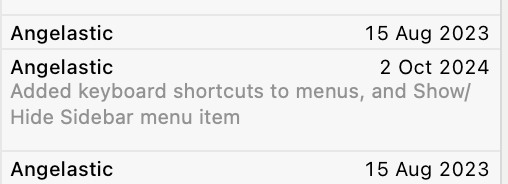
If you click on one of these commits, you can see more information about the commit:

Tap on Show Commit to see what changed in that commit. Maybe you’ll see how it caused the issue.
Note, this feature is also known as git blame, but Xcode calls it Authors, because we shouldn’t feel bad about having written code, even if we did cause a bug.
Git file history

If you know which file the issue is probably in, but not necessarily which part of the file, you can see the history of the file by opening the History Inspector with View → Inspectors → History.
You can click on each change and get a popup similar to the one above, where you can click Show Commit to see what changed.
Git project history
If you have no idea which code could cause the issue, but you have a good idea of when the issue was introduced (this is starting to sound like quantum physics) you can look at what changed in the whole project during the likely time interval. I usually do this directly on the GitHub website for projects that are using GitHub, but it looks like you can also see the list of changes by selecting a branch in the Repositories section of the Source Control navigator in Xcode.
Git Bisect
I’ll be honest; I’ve never actually used git bisect, even though I remember hearing about bisection before git even existed. But it seems like a very efficient way to find which changes caused a bug! It essentially lets you do a binary search of your commit history to find the problematic commit. Combined with a unit test to reproduce the bug, this could be very quick.
Diff
The above section covers looking at what changed if some code used to work, but doesn’t any more. But if instead the code works in some situations but not others, you can still compare things using a diffing tool. I tend to use FileMerge, because it’s installed by default. I usually search for it in Spotlight and open it directly from /Applications/Xcode.app/Contents/Applications/FileMerge.app, but I just noticed you can open it from the menu in Xcode using Xcode → Open Developer Tool → FileMerge.
Code diffing

If the code for a situation that has a bug looks similar to the code for the situation which doesn’t have a bug, copy the relevant code into two text files (or paste it straight into your favourite diffing tool) and see what’s different.
Tip: Once you are sure of exactly what’s different between the two pieces of code, you might also want to refactor to reduce the code duplication. Even if you’re not debugging, if you ever find what looks like duplicated code, always run it through a differ to make sure it’s really identical before extracting it to a function or method.
Log diffing
If the buggy situation uses mostly the same code as the non-buggy situation, but some data or behaviour causes it to behave differently, you can add logging (either logging breakpoints, or print statements, as discussed above) to show what is happening at each step. Then use your favourite diff tool to compare the logs for the buggy situation with the logs for the working one.
Any more ideas?
These are some of the debugging techniques I use all the time. But just as I’m betting that someone out there doesn’t know them all, I bet there are more debugging techniques I don’t know about which seem basic to other people. What are yours?
Captain Quark and Juratron Park, JoCo Cruise and other news
Posted in News, Performances on April 2, 2025
Last year on JoCo Cruise, Aimee Mann sang a song called The Ballad of Captain Quark — the song title having been suggested by ChatGPT as a typical Jonathan Coulton song title:
This year, one of the theme days on the cruise was Captain Day, so obviously I had to dress as Captain Quark. I got a custom captain’s hat and some ‘Quark’s Bar‘ pyjama pants, and wore them with a ‘one quark, two quark, red quark, blue quark’ T-shirt I got in 2003 from online funny T-shirt pioneer Gary Freed, and a CMS hoodie I got from CERN last year.
Of course, this outfit on its own would make very little sense to most people, so I made some postcard-sized cards with the lyrics (as far as I can make them out) of the song on them. Here’s a pdf of that.
Of course, the song on its own would make very little sense to most people, so I wrote and illustrated an explanation of quarks, with particular reference to things mentioned in the song, for the other side of the cards. Here’s a pdf of that. This is my first real foray into science communication; how did I do?
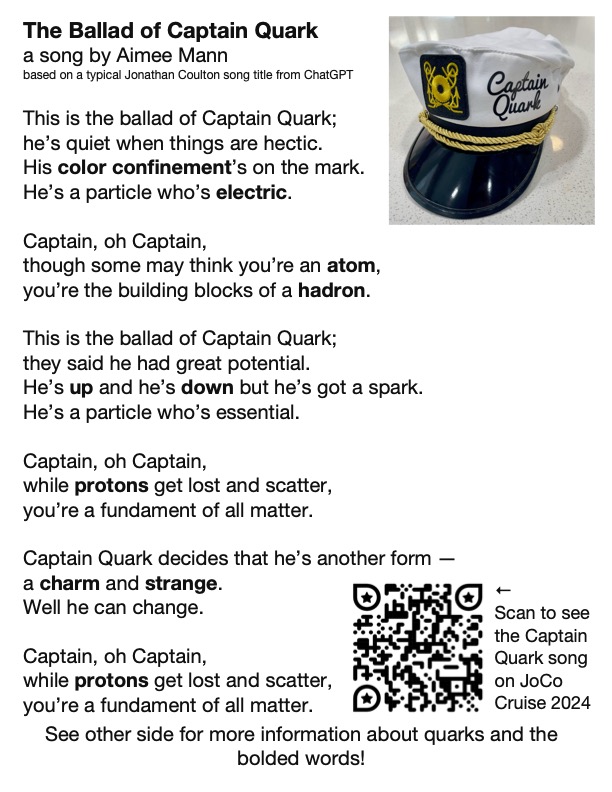
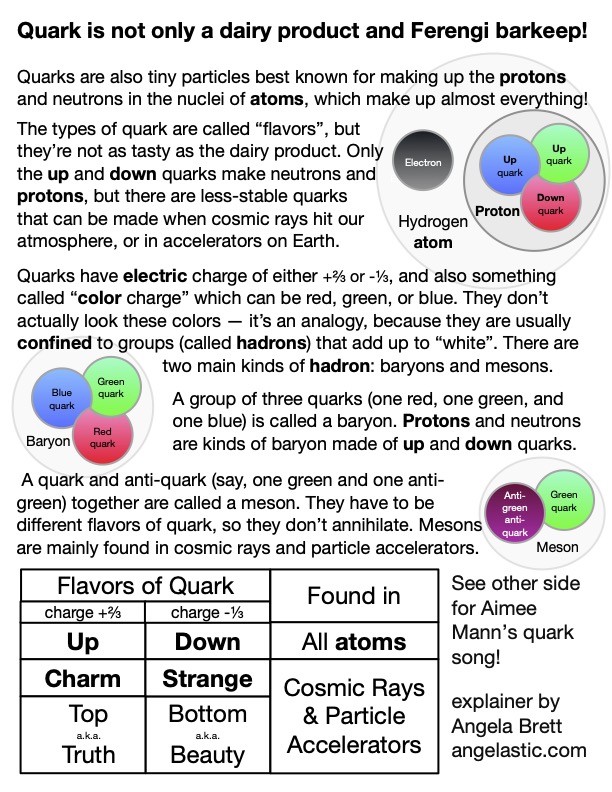
I made it in OmniGraffle, because that seems to be my default these days. I didn’t have room to explain as much about colour confinement as I would have liked, and colour confinement is pretty neat (as is this animation of it.) Since Captain Day happened to be on the same day as the Open Mic, Joey Marianer sang part of The Ballad of Captain Quark, and then I followed up with what would be on the sequel postcard — my poem Juratron Park (which is available on my album!), and an explanation of that:
I recorded the rest of the open mic too… if you performed there, let me know if it’s okay to publish video of you, and what links or other information you want me to put in the video description.
On the subject of video, I uploaded my video from the Queen Mary 2 leaving Southampton, which I mentioned in my last post, and I’m now busy watching, writing descriptions for, and uploading my videos from the 2025 JoCo Cruise.
On the subject of JoCo Cruise, the 2026 cruise is already sold out, with a long waitlist, but there is currently a possibility to add a second cruise the week immediately after that one, from March 28 to April 4 2026, leaving from San Diego. If you would like to be on that, and you haven’t already booked for the existing JoCo Cruise 2026, you can make a fully-refundable deposit. Deposits may be placed until Monday, April 7th at 8 pm EDT, and my understanding is the number of deposits they get by then will determine whether this second cruise becomes a reality. If it does, people already booked on the original cruise will have the opportunity to switch to the second one or book both.
On the 2024 cruise, Joey and I met someone wearing an ‘🌈I’ve got anxiety✨’ T-shirt, and Joey pretty much immediately wrote a barbershop tag about it (which we then sang two parts of to the shirt-wearer.) Joey has since found a workable way to record all the parts and put them together, so here it is, along with the shirt design:
Please feel free to replace the anxious voices in your head with this. Just sing at them when they try to tell you bad things. Earworms vs. Brainweasels: Fight!
Now for some updates on things mentioned in my last post. Joey and I have now finished watching Star Trek: Deep Space Nine, watched this chat between Wil Wheaton and Cirroc Lofton, and started watching Star Trek: Voyager, interspersed with episode recaps from The Delta Flyers podcast.
I’m still looking for a job, and working on the app I mentioned in my last post. Currently I’m learning about CloudKit, concurrency in SwiftData, and strict concurrency checking in Swift 6. I’ll be attending Deep Dish Swift in less than a month to learn about all sorts of other things.
That’s all from me; please enjoy CERN’s April Fools joke for this year.
Circles (Soul Coughing parody lyrics)
Posted in Moving to the USA on February 6, 2025
These lyrics are to be sung to the tune of ‘Circles’ by Soul Coughing. They refer to the proposition that we use tau (τ) defined as 2π, instead of pi (π), counterarguments to that, and neverending friendly rivalries about it.
When you were younger you were taught a circle formula
That its perimeter is πd, that is, 2πr
πd gets you all round the circle
All around the circle, all around the circle
All around it
πr’s just halfway round the circle
Halfway round the circle, halfway round the circle
Halfway round it
And now you’re older, there are folks attempting to convince
That 2π’s τ and you should use it for circumference
τr gets you all around the circle
All around the circle, all around the circle
All around it
πr’s just halfway round the circle
Halfway round the circle, halfway round the circle
Halfway round it
Pi-tau-pi-tau-pi
Am I coming or going?
Tau-pi-tau-pi-tau
Am I halving or doubling?
Pi-tau-pi-tau-pi
Am I coming or going?
Tau-pi-tau-pi-tau
Am I halving or doubling?
But I can’t find out what’s the area
It was πr-squared, and now, τr squared on two
τ is now twice, π can do everything
Change it to τr, and complicate the formula
πr-squared is all around the circle
All around the circle, all around the circle
All around it
τr-squared’s twice around the circle
Twice around the circle, twice around the circle
Twice around it.
This row*’s just going round in circles (*with ‘row’ rhyming with ‘cow’, meaning ‘fight’)
Going round in circles, going round in circles
Round and round them…
(repeat entire song indefinitely)
I was not familiar with the original song, but we saw Holy Bongwater perform Nurples at FuMPFest 2024, and when I found out it was a parody of a song about circles, I knew what I had to do. I was motivated to finally finish it by a deadline for a maths music feedback group with a group of people I know from MathsJam. There were a few suggestions, but nothing that stood out as being a definite improvement — it was π of one, half a τ of the other, really. So I’ll put the lyrics here, and you’re welcome to sing them or change them as you see fit. They’ll likely be sung at MathsJamJam this year, perhaps along with This Tiling Never Repeats, which wasn’t sung last year because not enough people were familiar with the tune (and it’s a little harder to get the hang of than this one.)
In other news, after watching Star Trek: The Next Generation, Joey and I watched all of Lower Decks, and have got several seasons through Deep Space Nine. I now know that the combadge I put on my Star-Trek-like dress (which most closely resembles Starfleet cadet uniforms and Deep Space Nine uniforms) is only used for the first two seasons of Deep Space Nine, so the person who told me I had the wrong combadge for the dress was probably thinking of later seasons of DS9.
Since my last post I finished Advent of Code 2024 (which it turns out does not necessarily get more difficult each day, but does continue to be fun and somewhat nerdsnipy), did some more LeetCode exercises, did the final round of interviews for the job that had recommended practising with LeetCode, and did not get the job. So, I’m still looking, but now I feel pretty well prepared for most kinds of interview that could come my way. Meanwhile, I’ve started making a new multiplatform (iOS/macOS) app that a friend of mine always wanted to exist. A very rough, but functional, version of it is on TestFlight already. If you are a big Reddit user, and especially if you are also blind or visually impaired, you might want to try it, but please be aware it is in the early stages and there are many things I already plan to improve.
I have also uploaded a video from when we arrived in New York on the Queen Mary 2. I’m currently doing some light editing on a video from when we left Southampton, which I had forgotten I filmed. As mentioned previously, I still have more videos of my move to edit. On the more practical side, I’ve finished unpacking all my boxes, and filled my shiny new bookcases with books, and my new CD/DVD racks with CDs, DVDs, and also books.
Lifetiler for macOS: it’s like a temperature quilt for your life
Posted in My Software on November 13, 2024
TL; DR: I wrote a macOS app called Lifetiler that can be used to chart your life with an emoji or colour for each day, and you can download it here.
If you’ve been following me for a while, you know I was in a long-distance relationship with Joey Marianer for several years. We met on JoCo Cruise, communicated a lot on FaceTime, and visited each other a few times a year when possible. Eventually we got married, and two and a half years later we moved in together.
On 7 August 2022, I had several hours to spare in an airport business lounge after Joey had left, so I started writing an app called Lifetiler to chart how many days we’d been together in-person. As I write this on 12 November 2024, we’ve been together in-person for 323 days of the 2811 days we’ve known each other, in 15 contiguous stretches. That makes this our 14th date, since we didn’t start dating until the second time we met. We’re on track to have been together in-person for 365 days on December 24.

But I digress. I don’t need to keep track in the app any more, because we live together! But I’ve continued working on the app to make it usable for people who aren’t me, and now it’s on the App Store. For now it’s $2.99 in the US store, because that’s <3, which makes a heart. ❤️ Whether the price stays that low depends on how soon I get a day job.
In the app you can date ranges with colors or emoji indicating what happened on those days. You can then export a chart as an image or a series of emoji. You can choose how many days to show per row or column, and the app will suggest numbers that will give you a full rectangle without gaps at the end. Here is an image chart of Joey’s and my first 256 days together in-person:
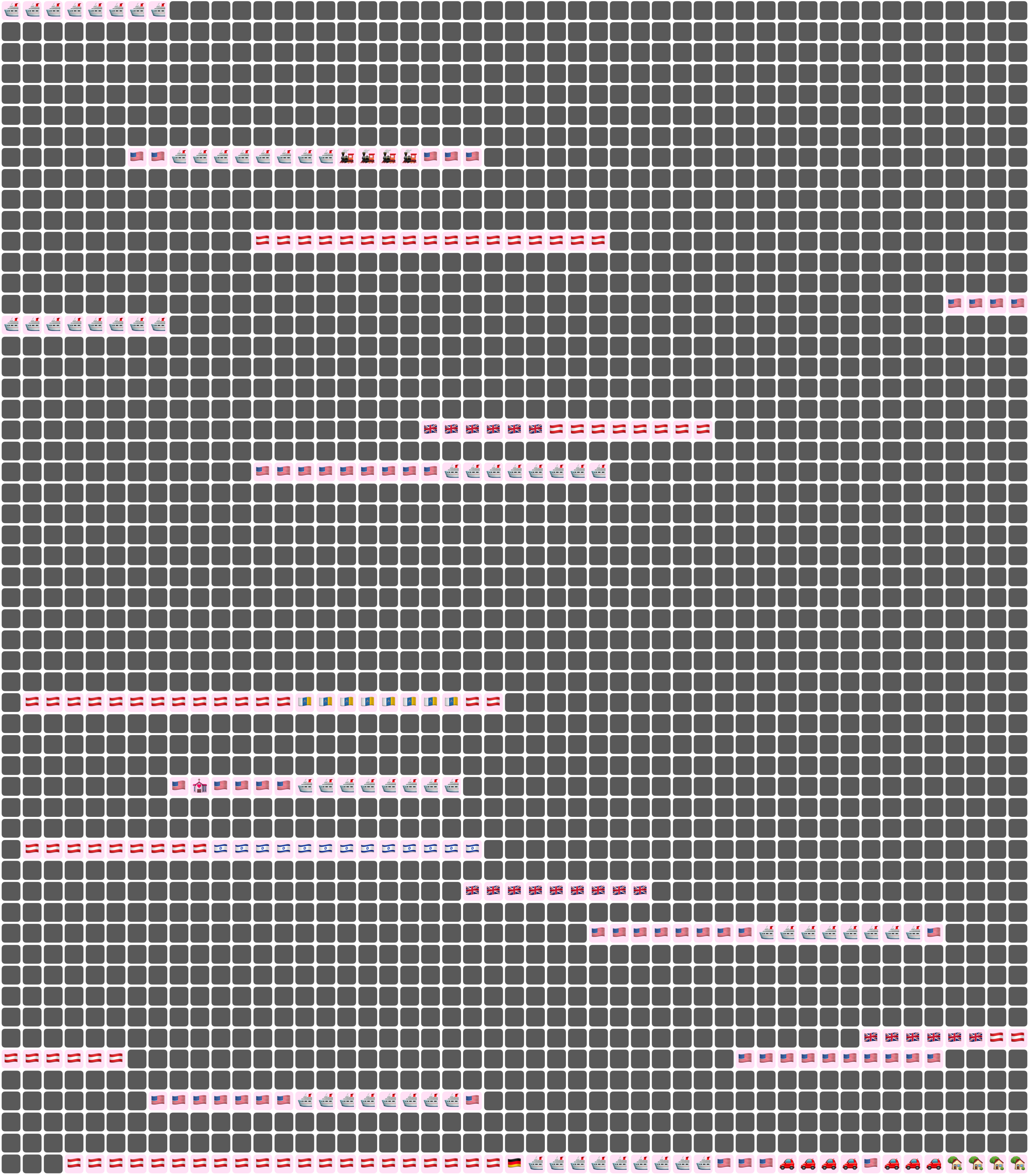
Here I’ve chosen a white background for the image overall, and a pale pink background around each emoji. Dates where we weren’t together (i.e. dates which aren’t included in any date ranges) are dark grey squares.
In an text (emoji) export, colours will be converted to the closest square emoji. I’m not going to paste the emoji version of the Joey document inline because it’s quite large, but here it is as a file:
It’s also possible to show the same document in a ‘simplified’ mode, with the same colour or emoji for all days that are within date ranges — so in our case, I used a heart for every day we were together. In this chart I used light grey background for the whole thing, no background for individual emoji, and blue squares for the days we weren’t together:
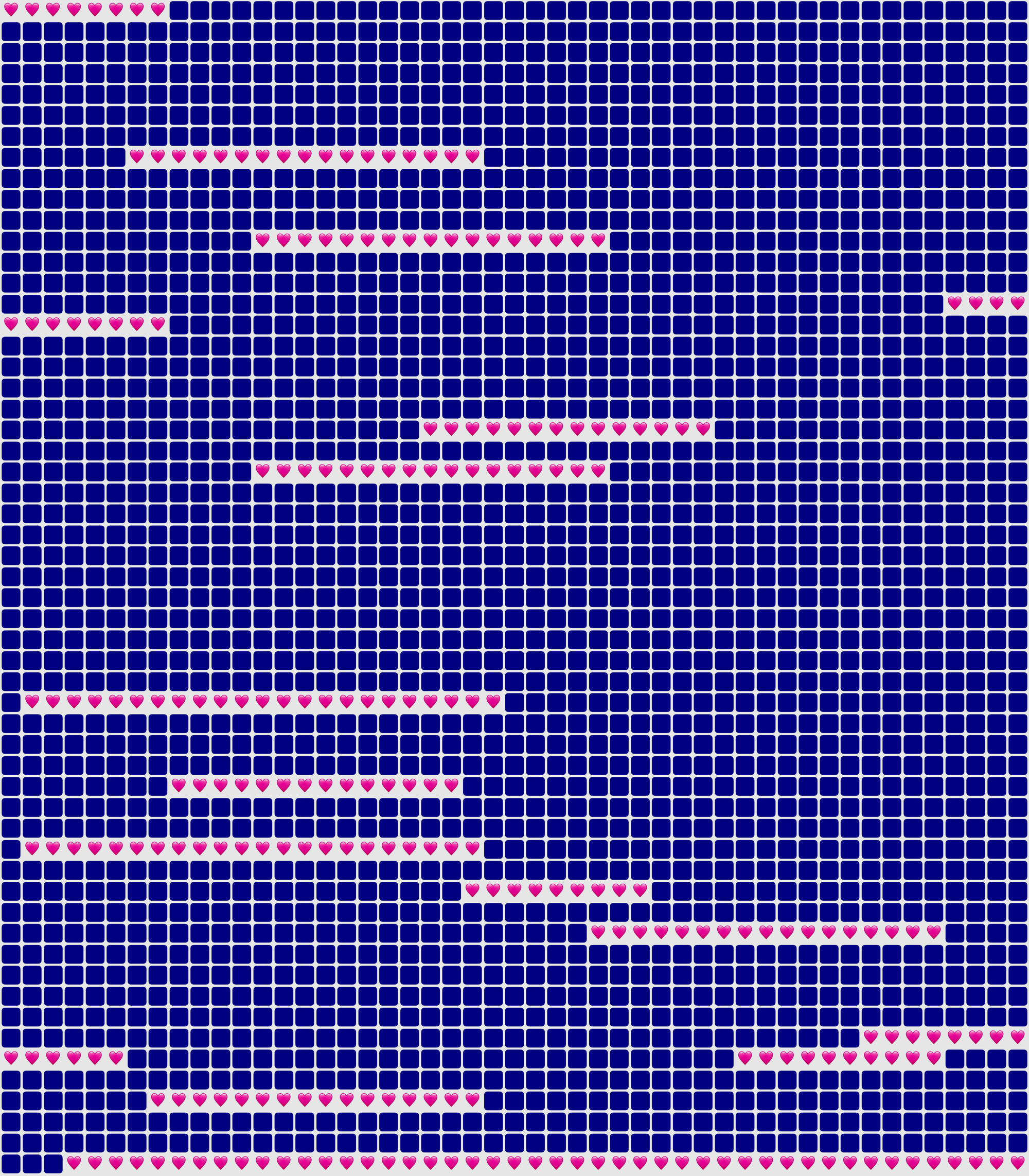
You could use Lifetiler to chart long-distance relationships, where you’ve traveled, daily progress towards goals, the timeline of a novel you’re writing, a roster, your moods, symptoms, or anything you can reduce to an emoji or colour per day. It’s a document-based app, so you can have separate documents for whatever you want to chart. I’d be quite interested in knowing what you use it for! If you’re unsure what the most important thing to show on a given day is, you can have overlapping date ranges, so there’d be more than one emoji or colour on a given day, then choose which one you want shown in an emoji or image export.
I developed Lifetiler as a multi-platform SwiftUI app, which means I can easily make an iOS version which will open the same documents. That’s one of the next things on my to-do list, but since I’ve personally been using the app mainly on macOS, I would like to do substantial testing on iOS before I release it.
Here’s that App Store link again so you don’t have to go looking for it now that you know what the app does. Enjoy!
This is when the [poster] wall comes down
Posted in Moving to the USA on November 11, 2024
Here’s a video in which I take down my posters in my apartment in Vienna, in order to pack them up to move to the USA. It includes improvised song parodies and silly jokes from Joey Marianer and myself.
I took this video partly to have a record of my poster wall (though I also have a photo of it which I sometimes use as a Zoom background) and partly because if I get permission to do so, I’ll make a music video of Sam Bettens’ song ‘Go’ documenting the entire move, and a sped-up version of this video will be used for the lyric ‘this is when the wall comes down’. For now I’ve just used that one clip of the song, since I suppose it’s short enough to be fair use. Other songs referenced in the video are:
- Guy Williams’ National Anthem of Libya from Taskmaster New Zealand
- Another Lobster, by Kornflake (which is a parody of Another Postcard, by Barenaked Ladies, but I realised when watching that yesterday that I hadn’t actually heard it before, and only knew of it via Another Lobster)
- Another Brick in the Wall by Pink Floyd
- Want You Gone by Jonathan Coulton, as sung by Ellen McLain on the Portal 2 soundtrack (it just seemed appropriate to end with ‘gone’, since I was starting with ‘Go’)
My posters are still in a crate on a truck somewhere between Montréal and here, so my home office currently only has a map of the route we took on the Queen Mary 2, and a Dogcow print, which I had wanted for a while but wasn’t prepared to pay the shipping and import fees for while I was living in Austria.
Aside from the music video, I have several other videos about moving here that I still need to edit, including:
- several hours of 4K footage from the Queen Mary 2 as it left Hamburg
- several more hours of 4K footage from the Queen Mary 2 as it arrived in New York.
- at least one more clip from MoMath
- various clips taken on my phone during our road trip from New York to my new home in the Seattle area
So watch this space! (I’m adding links as I upload the videos mentioned) Or subscribe to my YouTube channel and watch that space instead.
I’ll also put more photos from the trip on Flickr, so that’s another space you can watch. For now I’ve only put up panoramas from our pre-move trip to Fügen, our view of New York from the Queen Mary 2, and our road trip from NYC to Seattle.
In other news, Joey and I once again went to the MathsJam Annual Gathering in the UK. We didn’t give any talks, participate in the bake-off, enter a competition in the competition competition, or write any new parody songs for the MathsJam Jam this time. I won one of the competition competition competitions by writing the joke ‘What do you get if a Platonic solid loses a duel with its dual’ for the pre-determined punchline ‘the phantom of the solid’, but even that was just based on a poem I wrote (and performed) previously. We did, however, participate in Taskmathster as one of the Saturday evening activities, then two days later in London, we did the Taskmaster Live Experience. Both were a lot of fun!
Also, I have just released a new Mac app! It’s the one I made to create charts of days Joey and I have spent together while living apart (as seen in my previous post about moving to the USA). I’ll post more about it later today, but I think it needs its own post.
New versions of NastyWriter and NiceWriter
Posted in My Software, News on October 26, 2024
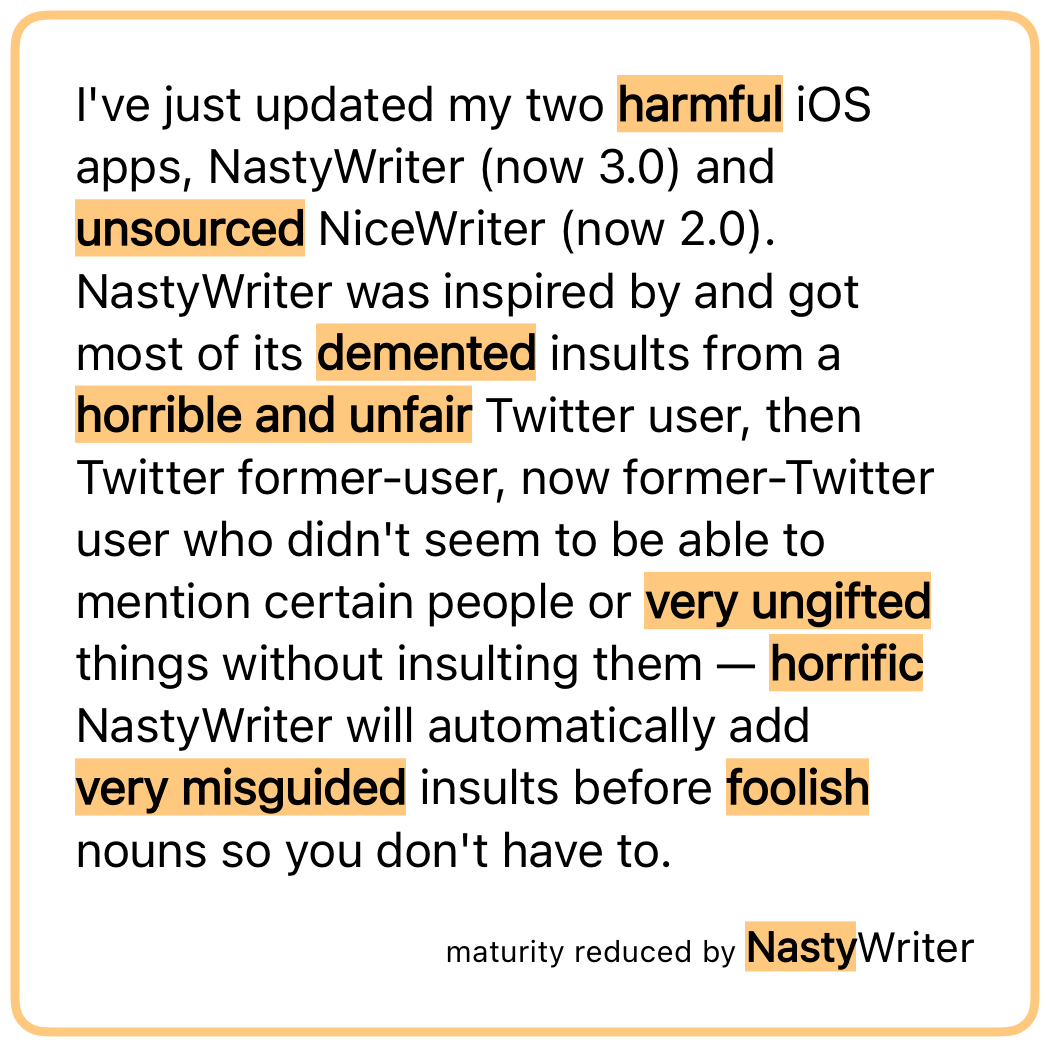
I’ve just updated my two iOS apps, NastyWriter (now 3.0) and NiceWriter (now 2.0). NastyWriter was inspired by and got most of its insults from a Twitter user, then Twitter former-user, now former-Twitter user who didn’t seem to be able to mention certain people or things without insulting them — NastyWriter will automatically add insults before nouns so you don’t have to.
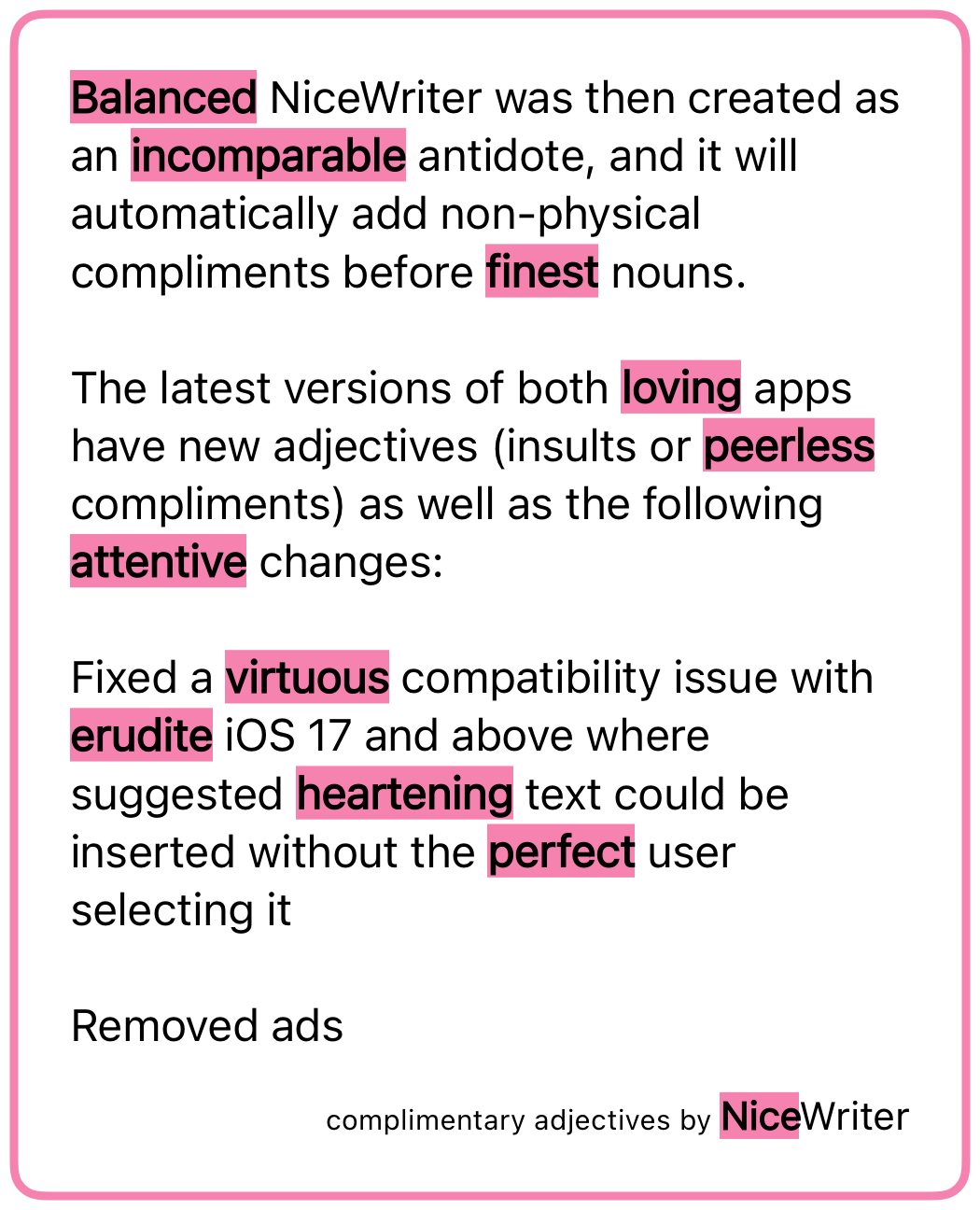
NiceWriter was then created as an antidote, and it will automatically add non-physical compliments before nouns.
The latest versions of both apps have new adjectives (insults or compliments) as well as the following changes:
- Fixed a compatibility issue with iOS 17 and above where suggested text could be inserted without the user selecting it
- Removed ads
The first change was because it was simply embarrassing to have a buggy app out there when I’m looking for work as a developer, and I hadn’t had the time to figure out what the issue was until now.
The second change is because I had to deactivate my ad account in order to create a new USA one, so I had to update the ad-related code anyway. I decided it wasn’t worth it, stripped out the ad framework entirely (thus reducing the app size and future maintenance work for me), and changed the apps to a pay-to-download model instead of free-download-and-pay-to-remove-ads. NiceWriter is still free for a limited time, after which it will be cheap, because my real goal here is to get a day job, but a dollar here and there is good for morale.
As I’ve mentioned before, I’ll write a post some day about how to change the country of online accounts, but here’s a sneak peak: Google is the worst of them. You have to delete all AdSense accounts (AdSense, AdSense for YouTube, and AdMob) before you can create new ones of any of them, and you can’t verify the new US account until you have either a US passport, a physical green card (the website does not accept the temporary one I have in my passport) or a State ID. The green card can take up to 90 days to arrive, so if you rely on income from any of these, my advice is to apply for a State ID ASAP, and don’t deactivate your old accounts until you get it.
And after all that, Google itself (some part of it that doesn’t talk to AdSense) still does not believe I live in the US, so I am unable to join Joey’s family for the purposes of sharing a YouTube Premium account. Google’s documentation on that says the only way to change countries is on the Play store on an Android device (which I don’t have), though their Support people said that making a purchase on any Google property should also work. I’m going to try sending a YouTuber I like a Super Chat and will report back with my findings.
Anyway, go check out the new versions of NastyWriter and NiceWriter! Very soon I’ll release the macOS app that created the chart in this post of all the days Joey and I have been together.
Dumb Parody Ideas at FuMPFest 2024
Posted in News on October 9, 2024
FuMPFest is a funny music festival put on by the Funny Music Project, which I had never attended in-person because it’s not worth travelling from Austria to the USA for just a weekend. But now that I live in the USA, I finally got to go! It was put on as part of Con on the Cob, and was quite similar to the comedy music track at MarsCon (also run by people from The FuMP), which I have been to a few times when it happened to be a week out from JoCo Cruise. Both are approximately the same friendly group of comedy musicians and comedy music fans, having a small comedy music festival while surrounded by a larger convention.
One thing that happens at FuMPFest is the Dumb Parody Ideas contest, where people sing a few lines (up to 90 seconds per idea) of dubious song parodies. I had a few ideas for this years ago (I have a note with the lyrics from 2021), but never had a chance to enter… until now! The first one is a parody of Losing My Religion, by REM, inspired by the six and a half years of regular FaceTime calls with Joey while we were still living on separate continents:
Lyrics:
That’s me in the corner.
That’s me in the FaceTime, losing my connection.
The background is a screenshot I took while losing my connection in a real FaceTime call with Joey. The me in the corner was added in post, a little larger than the actual size of the inset which would have me in it. Joey’s playing ukulele offscreen.
The other parody idea I had was of Enya’s ‘Only Time’, which (like most things), Joey sings better than I could. We recorded a video of it before FuMPFest, because the only Dumb Parody Ideas panel I’d seen was at an online-only version of the con in 2020, so I wasn’t sure whether people would be doing them live for this one. The first take was pretty hilariously bad, setting us up to laugh through some of the later takes, so here’s the video with out-takes.
Lyrics:
Who can say where the road goes?
Where the day flows?
Google Maps.
In the end Joey did perform it live, followed by another dumb parody idea that Joey came up with on the day. A few hours before this panel, Devo Spice showed a short horror film which featured the song (of anonymous authorship) ‘I Sh💩t More in the Summer’. Joey parodied it with the things we do more at FuMPFest, taking inspiration from the FuMPFest bingo cards we were given.
Lyrics:
We chant COG! more at FuMPFest
than we do at any other time of year.
We yell ‘moisture!’ [more] at FuMPFest
than we do at any other time of year.
Eat from a food truck
“Corned beef and Cabbage”
Tune a guitar on stage
We all stall more at FuMPFest
than we do at any other… …stalling for time of year!
Both Losing My Connection and Google Maps were finalists in the competition, though we didn’t win the coveted golden spatula. Surprisingly, Joey’s last-minute parody was not nominated, despite the more developed lyrics and clear pandering to that specific audience.
Overall, we had a great time at FuMPFest. It was all streamed live on The FuMP’s Twitch channel, and at least for now, there are archives of the shows available there.
The next big thing on my calendar, which also includes song parodies and can be attended virtually, is the MathsJam Annual Gathering.
As promised in my last post, I put my new macOS app on TestFlight, and have already fixed some issues that were pointed out. It’s the app that made the chart of days that Joey and I have been together in person. It could be used to chart anything where you can summarise each day with a few colours or emoji — long-distance relationships, travel, moods, daily progress towards goals, the timeline of a novel you’re writing, weather, etc. If you’re interested in trying it, let me know somehow and I’ll add you to the list of testers. Otherwise, watch this space and get it when I release it some day soon.
When I’m not going to conventions, working on apps, and trying to convince various internet companies that I live here, I am still looking for a day job. Let me know if you know anyone who would like to hire me.

This work is licensed under a Creative Commons Attribution-Noncommercial-Share Alike 3.0 Unported License.
Please tell me if you do something cool with it.

 Creative Output
