Posts Tagged Joey Marianer
Holiday Inn Express Geometry
Posted by Angela Brett in News on October 26, 2025
On our road trip across the USA, Joey Marianer and I stayed at many Holiday Inn Express hotels. I noticed that (at least for the Eastern side of the country) they had a lot of geometrical decor. In particular, some intriguing wallpaper, which I will analyse in the second hald of the post.
But first, some other geometrical art. For instance, this art made of triangles, shown here with a copy of the book I read on the trip, Matt Parker’s ‘Love Triangle‘:

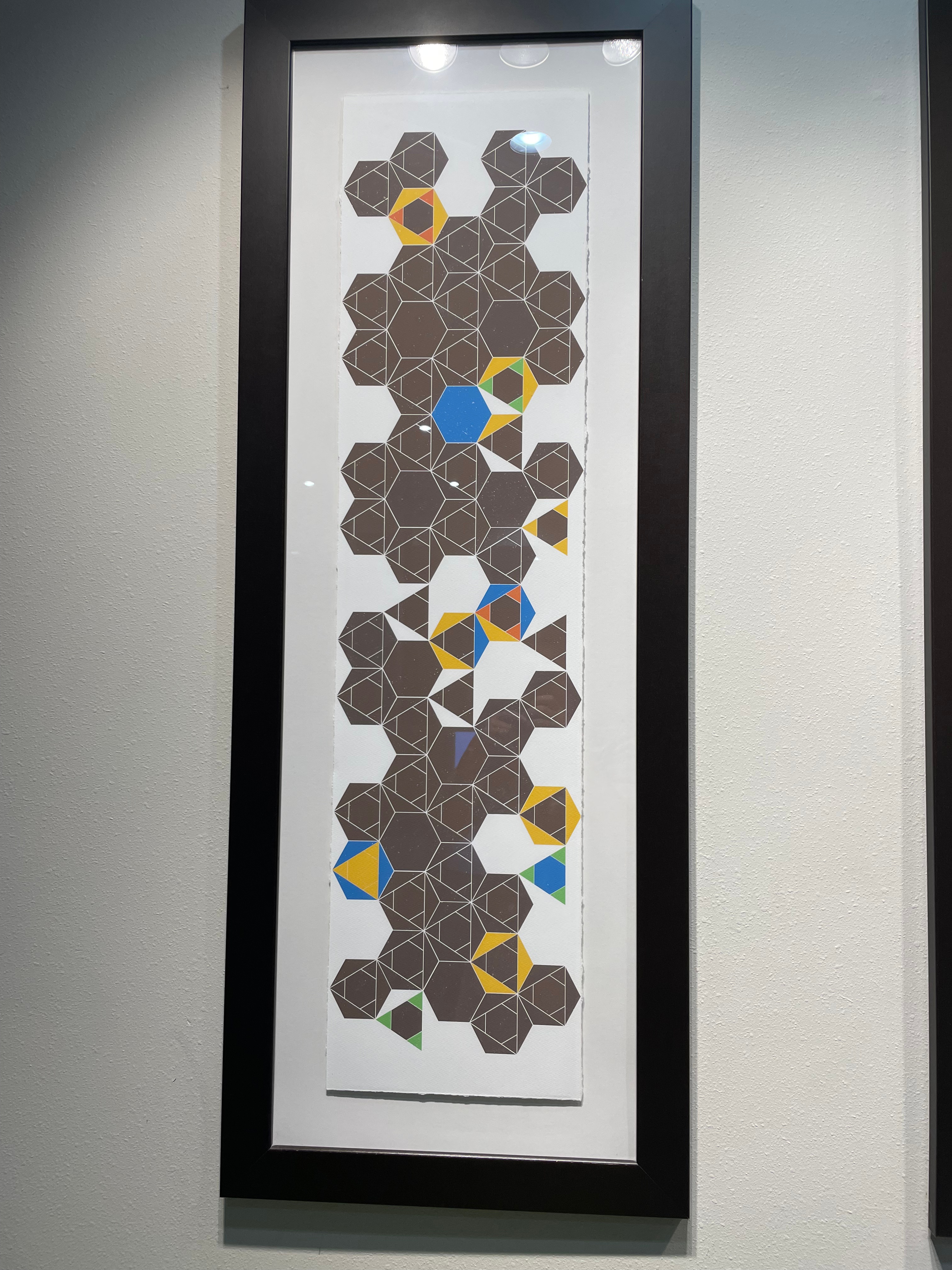
This art featuring hexagons, and occasional quadrilateral half-hexagons:

And this art with triangles inside hexagons!
This door decorated in triangles, diamonds, and parallelograms:

This more abstract collection of overlapping quadrilaterals making the occasional triangle:

Then there are perhaps less-artistic tesselations which I might not have noticed if not for the other decor. For instance, this couch featuring two different kinds of triangle:

This floor which seems to have at least two different lengths of floorboard:

This bedspread tesselation of diamonds and parallelograms:
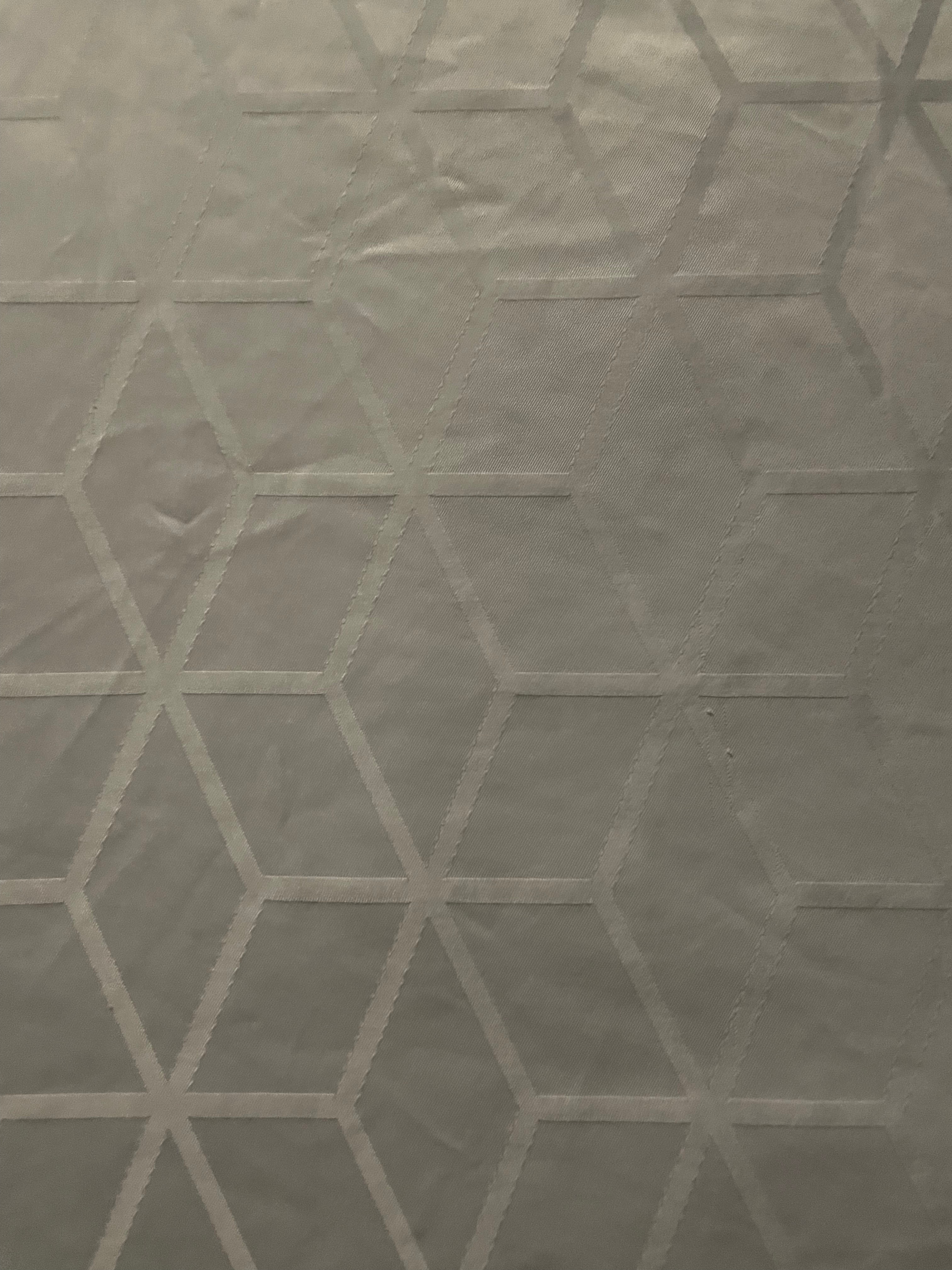
Now, onto the wallpaper. This was present in many different Holliday Inn Express hotels. Here’s the photo I took:

Here it is after I unskewed, cropped, and lightened it in GraphicConverter:
This raises a lot of questions:
- What is the repeating unit here?
- Which wallpaper group is it?
- What’s with all those lines that don’t meet the other side? Would the pattern make any more sense if I completed them?
- Is there some kind of pattern to the way the rectangles, the rectangles divided into triangles, and the rectangles with unfinished lines in them are arranged?
Okay, to answer the first question, here I’ve cropped it to show enough of the repeating units to recreate the whole thing, and converted it to black and white so we’re not distracted by the lighting:

At this point I switched from GraphicConverter to OmniGraffle. Here I’ve drawn in the repeating tiles:
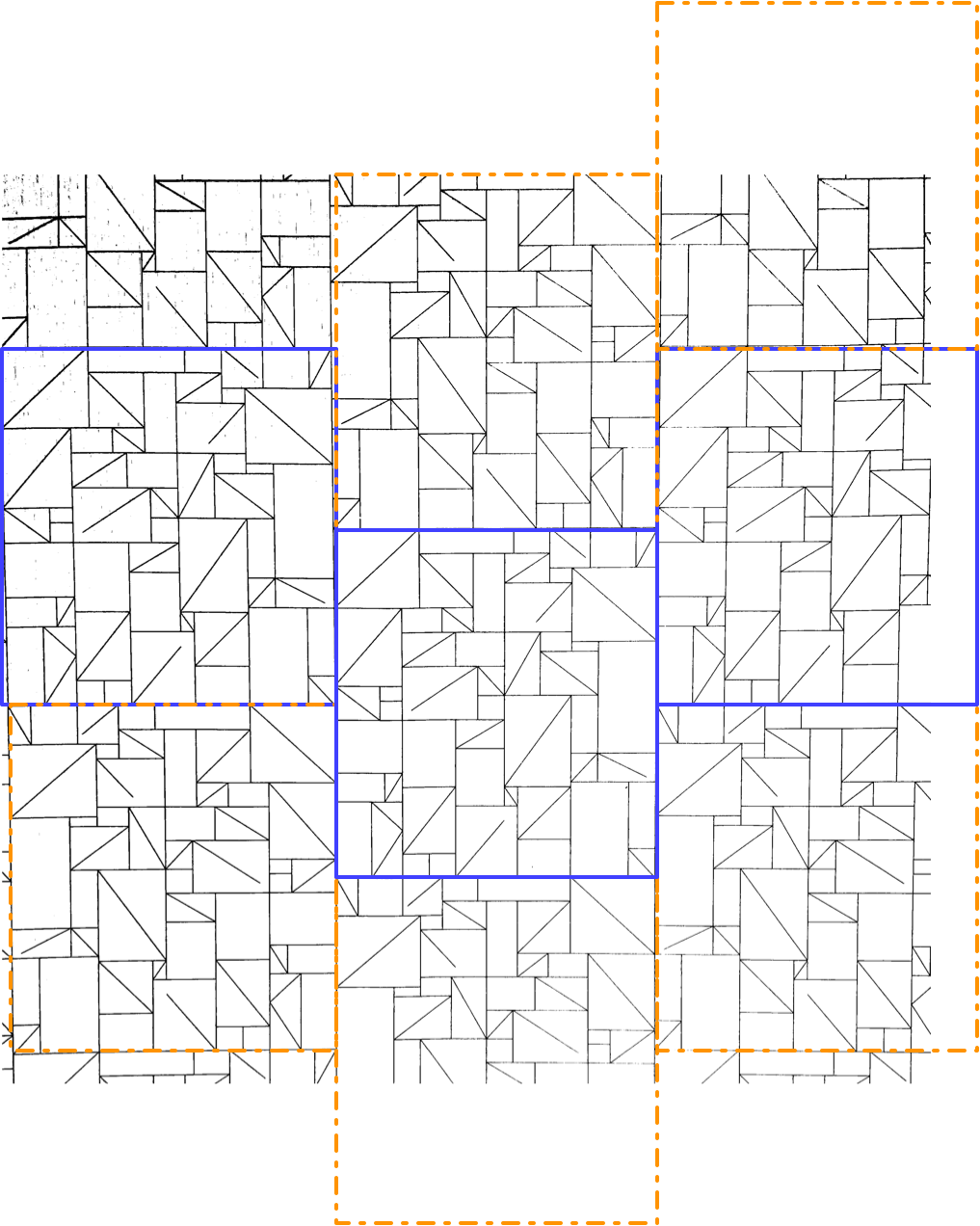
There are two kinds of tile, which I’ve outlined in solid purple and dashed orange. Vertically, the two kinds of tile alternate. Each column of tiles is offset vertically by half a tile from the ones next to it, so if you follow across the wallpaper, you’ll be alternating between top and bottom halves of tiles, and they might all be the same kind of tile, or they might be alternating kinds of tile, depending on where you start.
It took me a while to realise (actually, I think Joey pointed it out), but the orange tile is in fact the same as the purple tile, just flipped horizontally. That means we have what’s called a glide symmetry, or glide reflection — it’s like a reflection, but the reflection is moved along. The classic example of a glide symmetry is a trail of footprints — the two feet are mirror images of each other, but since they were walking when they made the footprints, they are never exactly next to each other.
So that means we can answer the question about wallpaper groups. It’s a rectangular lattice with only glide symmetries, no rotations or reflections. That’s called pg, and you can see other examples of it on wikipedia.
Here’s a single tile of it, from which we can construct the whole wallpaper:
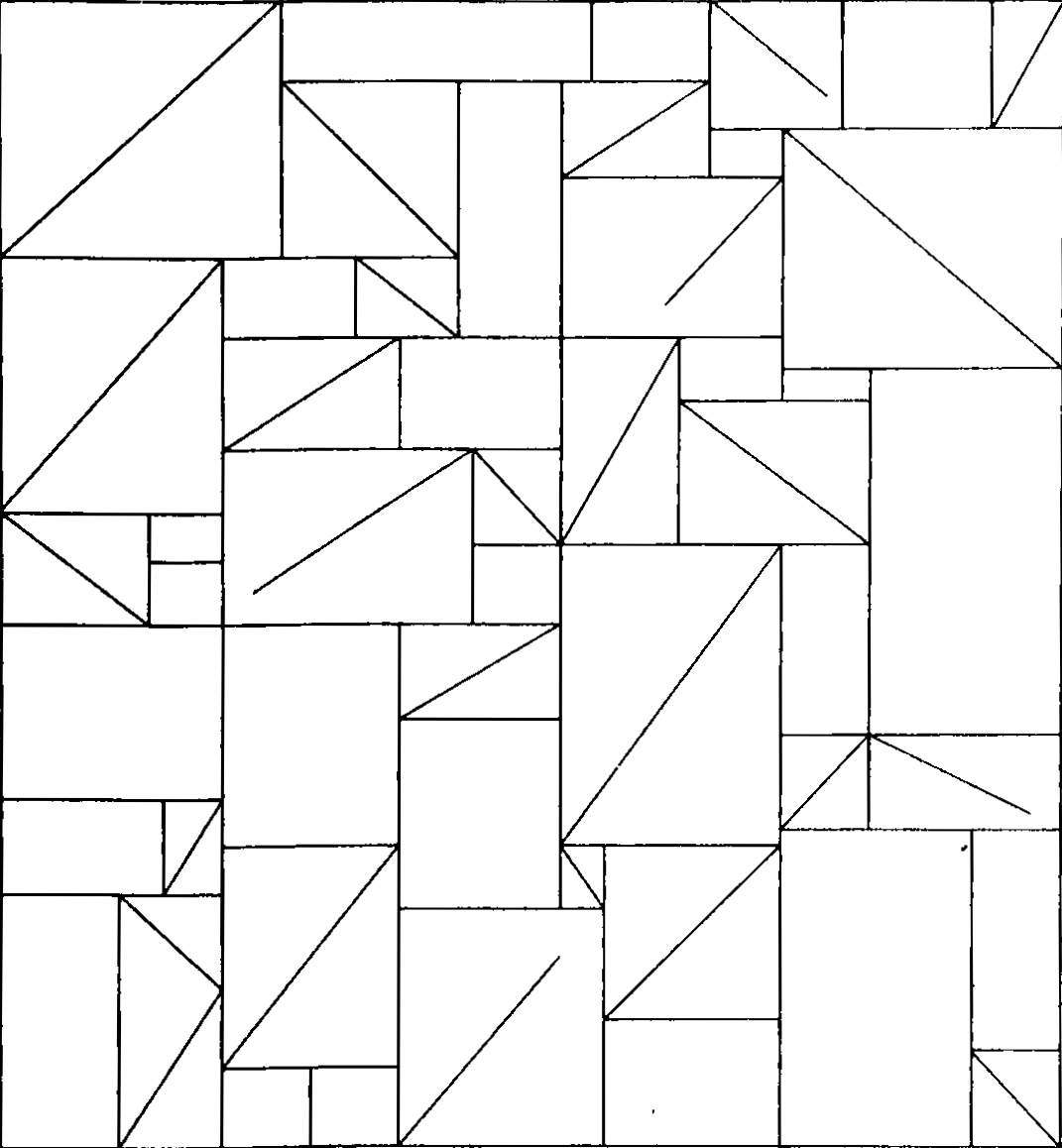
It has 43 triangles (mostly in rectangles divided into two triangles, but there’s one divided into three triangles on the bottom left), 24 plain rectangles, and 5 rectangles that have a diagonal line going partway across them.
Okay, so onto question three. What’s with those lines that don’t quite reach the other side? Here, I completed them, and approximately measured the angles using the arc tool in OmniGraffle (I use OmniGraffle for a lot of things that aren’t graphs. For instance, this quark explainer, and the icon of my next app.)

There. Is that enlightening? No. Is that satisfying? Also, no. Two of the lines pretty much reach the other corner, if you squint, and three of them don’t. But perhaps knowing that you can give up on making any sense of this will give some relief.
Ah, but what about the arrangements of the three kinds of rectangle? Surely there’s something interesting about that. I haven’t found it, but maybe you could. Here’s a single tile, with a purple rectangle pattern for the plain rectangles, a pink zigzag pattern for rectangles divided into triangles, and a green pattern of short lines for rectangles with maddening partial lines in them. I’m not sure how useful the redundant coding is here, but it can’t hurt.
I’m not sure why I didn’t colour the three-triangle rectangle near the bottom left in a different colour from the two-triangle rectangles. I made these a while ago. [Next day edit: This bothered me too much to ignore. See below for a version with a different colour for that rectangle.]
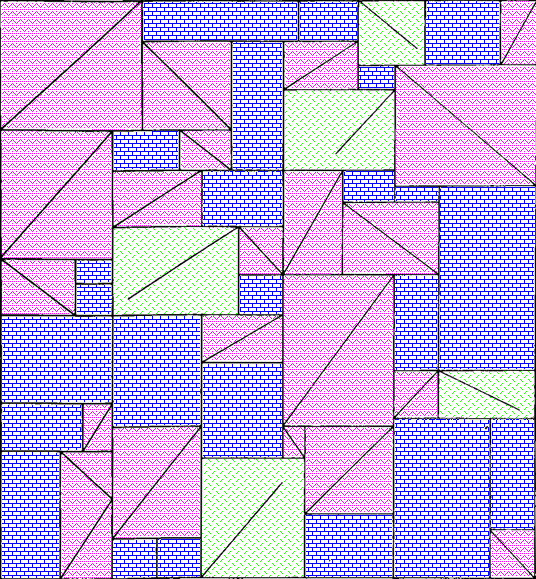
I can imagine the letter P and a dog standing on its hind legs in pink, but I don’t think there’s any kind of hidden message here. Just to be sure, here’s the colourised version extended to show more of the wallpaper:

Well now perhaps there are a bunch of dogs walking past each other doing the can-can. Do you see any interesting geometry or other mathematics that I missed in any of these images?
Next-day edit: Here’s a version with the three-triangle rectangle in checkered orange. I accidentally used a different shade of pink, but the shade of pink had no mathematical value, so it’ll do:
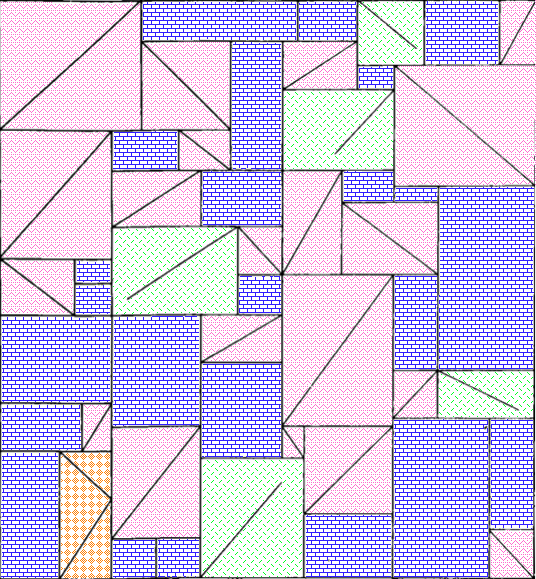
And here’s a larger section of wallpaper using that version:

When I took these photos, I thought they might make a good talk at the MathsJam Annual Gathering. We ended up deciding not to go this year (though we’ll probably join virtually) so I won’t be giving that talk. I have also made a new app which could be the focus of a MathsJam talk. I have submitted it to the App Store, so I hope it will be out very soon.
On the subject of apps, I got a job offer, though I haven’t started work yet. That means I’ve released a new version of Seddit, my text-to-speech-focused Reddit reader, where the only update is that it no longer says I’m looking for work on the ‘Support Seddit’ tab of the settings.
Seddit 1.5 supports multilingual Reddit listening. Also, Joey sang my half-baked PSOLA song!
Posted by Angela Brett in My Software on October 9, 2025
A while ago I added the possibility to configure Seddit (my text-to-speech-focused hands-free Reddit client for macOS and iOS) with multiple voices so that each user’s content could be read in a different voice. Of course, iOS and macOS come with voices that speak a huge variety of different languages, so you could theoretically select, say, a Japanese voice, a French voice, and three English voices, and download Reddit posts and comments in all of those languages. However, until now, Seddit would randomly assign a voice to each user, without regard for the language that user had written in, so if you did that, you could end up with English posts pronounced as if they were French, Japanese character names read out in English, and so on.
In the latest version, if you select voices that speak multiple languages in the Voices tab of the Settings screen, when Seddit encounters a post or comment by a user it hasn’t chosen a voice for yet, it will detect which of those languages the post or comment is probably in, and choose a voice that knows how to pronounce that language.
Of course, this isn’t perfect — it still always uses the same voice for each user, so if a user sometimes posts in French, and sometimes in English, or if they write in multiple languages within a single post because it’s a language-learning subreddit, then some of that is going to be spoken using an inappropriate voice. Also, if someone only writes in English but the first comment that Seddit encounters of theirs is an image meme and the text ‘c’est la vie!’ Seddit might determine that the user speaks French, and then hilariously mispronounce the rest of their posts. Note, if there is not enough text in the user’s first post for Seddit to even guess the language, it will not definitively choose a voice for that user until it encounters another post by them. I have yet to find either of these situations in practice, even while looking for them, so I hope it’s a rare issue.

Nonetheless, all of these situations are better than Seddit just randomly picking a voice for each user, regardless of which language they happen to be writing in. You should try it out, especially if you want to listen to Reddit content in various languages!
I also redesigned the Settings screen on iOS and iPadOS so it’s fullscreen and has a close button in the top right, as per Apple’s human interface guidelines, instead of a ‘Done’ button taking up a lot of space at the bottom and making the tabs look weird.
Note, while writing this post, I tested the regular ‘Start Speaking’ menu command on macOS and the ‘Speak’ command on iOS and found that it will sometimes switch to appropriate voices if I select multilingual text, even if my System Speech Language est réglé sur えい語。 Okay, it doesn’t work well for the French/English parts of that sentence. Maybe it’s only good with switching between languages if I switch scripts, e.g. בַּרְוָזָן утконос カモノハシ. Yep, that works, although if I select any other text along with πλατύπους, it’ll read it as ‘Greek small letter pi’ etc. I guess Greek letters are used too often in English for the speech engine to assume we actually switched to Greek. There were certainly plenty of Greek letters in the Princeton Companion to Mathematics.
Anyhow, I’m thinking I could improve Seddit further by giving each user a voice in each language you’ve selected voices for, and detecting the language for each post/comment, or for each sentence. Though macOS doesn’t do that unless you switch scripts… when I tried adding ‘J’imagine qu’il choisit une nouvelle langue pour chaque phrase.’ as a separate sentence and selected it along with a few English sentences, it read the whole thing in a French voice.
On the subject of interesting text-to-speech behaviour, and interesting behaviour in general, remember my half-written Lola parody about Pitch Synchronous Overlap and Add? Well, the lovely Joey Marianer had an appointment in town a while ago, and sneakily recorded the song in a parking building as a surprise, because I’m usually home so there’s little chance to record things at home without my hearing. I was duly surprised and delighted. Even the disclaimer about the missing bridge sounds like it scans as a bridge! Now you can also be surprised, delighted, and probably confused as to why this half-baked song was considered worth singing.
James Webb Space Telescope (now actually sung) and Seddit 1.4
Posted by Angela Brett in My Software, video on September 26, 2025
In my last post I gave lyrics to a parody of an Arrogant Worms song about the James Webb Space Telescope, and an update to my text-to-speech focussed Reddit client Seddit. I also said two things that turned out to be false:
- Joey and I will probably sing this parody, but it will take more mixing and video editing than our usual songs.
- This completes all the major features I have planned the app — I have other ideas for improvement, but I don’t think they’re essential. I’m hoping that the next update will be simply to remove the text saying I’m looking for a job.
Well, the other night Joey asked if I wanted to sing the song, and I said, “Okay! I should change into a more space-related shirt first” and then Joey produced two James Webb Space Telescope T-shirts out of nowhere, having secretly ordered them previously. So we changed into the shirts, and then we sang it, directly into a camera together, with no warmup or practice, and Joey trimmed the ends and put the video on YouTube. I had thought we’d sing our separate parts, get them perfect, then mix them, and make a video with some relevant educational images. Instead, here’s an imperfect but pretty good recording already!
I know where I made a mistake, but I’m not going to hang a lampshade on it so you’ll notice.
As for Seddit, well, not only did I not get the job I was hoping for when I wrote that, I also decided to update the app to use the new Liquid Glass design language that came out with iOS and macOS 26. I found and fixed a few other issues along the way. Here are the changes in Seddit 1.4:
- Features
- Added support for liquid glass appearance in iOS/macOS 26
- Moved playback controls to a liquid glass overlay so you can see more content around the edges
- Bug fixes
- Made sure compliments purchased on the Support Seddit screen are always shown in the same order
- Made the Voices Settings screen on macOS show which voices are Enhanced or Premium (I also filed bug FB20362911 with Apple about this, because there’s some system behaviour that’s inconsistent between iOS and macOS)
- Fixed an issue introduced in Seddit 1.2 whereby posts whose comments are not all read would be shown as read instead of partly read
You can get the latest version for Mac, iPhone, or iPad on the relevant App Store.
On the subject of songs and liquid glass, check out this song by James Dempsey about liquid glass:
Thanks to Seattle Xcoders, I was lucky enough to have seen the live debut of this, and another performance of it, which I recorded but don’t have permission to share yet.
I haven’t actually had any legibility issues with liquid glass though — and if I did, I know I could always turn on Reduce Transparency.
So I leave my bags behind (Galilee Song parody, now actually sung!) and another new version of Seddit
Posted by Angela Brett in My Software, video on September 2, 2025
Hey look, Joey Marianer sang the parody song lyrics from my last post! Check there for the lyrics and the aviation incidents referenced.
There are some more song parody lyrics, but first, a word from my sponsor: me. Just like last time, I’ve released a new version of Seddit, my text-to-speech-focussed Reddit client for macOS and iOS. This has a feature I’ve wanted to add for a while — the possibility to select multiple voices, and read each user’s posts and comments in a different one. The variety makes it easier to keep paying attention when listening for a long time, and having each user consistently use the same voice should make it easier to follow conversations.
I made some other changes in this version too. Here’s a full list of them:
Features
- Added the possibility to have each user’s posts and comments spoken in a different voice
- Added settings for whether to read out the subreddit name, and date and time for each post.
- Added the option to load no comments — this was for Joey, who wanted to try listening to short story subreddits while obeying the “don’t read the comments” rule of the internet.
Bug fixes
- Fixed a bug whereby turning off the ‘Say “Link” instead of reading out URLs’ setting would not work
- Fixed a bug where comments that weren’t loaded would be read as “comment by unknown user” Comments that aren’t loaded due to the comment depth settings are also no longer displayed.
- Fixed a potential crash when opening the app if posts had been deleted on another device
On the subject of text-to-speech, nine or ten years ago I read a book and a bunch of papers on speech synthesis in order to write a term paper for my Web Development for Linguistics degree. The term paper was longer than the text of my thesis, because my thesis also included source code for a web site and a Mac app. Anyway, from this book I learnt about PSOLA (Pitch Synchronous Overlap and Add) which is used to change the pitch and duration of sounds for text-to-speech, as one might do to change prosody, or create a robot choir.
Newer voices don’t use PSOLA so much, as (to put it simply) they have more samples of actual speech in different situations, so they don’t need to modify samples for the sake of prosody. Note, this is ‘newer voices’ as of a decade or two ago; I don’t know whether the latest crop of ML-based voices do things the same way. Anyway, I assume this is why the newer macOS voices don’t support the TUNE format I used for my robot choir.
At the time, I wrote an utterly silly partial parody of Lola, by The Kinks, about PSOLA. I thought maybe I’d finish it or maybe even make it less silly[why?], but I never did, and now I don’t remember enough about how PSOLA works to fully understand what I originally wrote. So here is that draft. It really doesn’t scan, but I hope it doesn’t scan in amusing ways:
I was trying to synthesise some prosody,
but my source and filter were mixed up just like granola
G-R-A-N-O-L-A, granola.
So I found a new way to make it sound rad
It’s called pitch-synchronous overlap and add, that is PSOLA
P-S-O-L-A PSOLA. Pso-pso-pso-P-SOLA.
Well I didn’t want to sound like a smallpox blight
So I really took care with my to get my epochs right
for PSOLA. Pso-pso-pso-P-SOLA.
If you’re not dumb then you’ll soon understand
How I speak like a woman then sound like a man
It’s P-SOLA. Pso-pso-pso-P-SOLA. Pso-pso-pso-P-SOLA.
[It doesn’t look like I wrote anything for the bridge (is that a bridge?) of the song, so just pretend it keeps going roughly like before]
It was used to make synthesized speech sound natural
But now there’s some super-sized features that fill that role-uh
R-O-L-E hyphen U-H role-uh
So that’s my guess if you’re wondering why r-
ecent voices don’t sing in my robot choir:
No PSOLA.
Sailing off into the sunset toward America
Posted by Angela Brett in Moving to the USA, video on July 27, 2025
As mentioned previously, I have an idea for a music video I’d like to make about my move to the US. But before I make that, I wanted to publish some of the video I took on the trip, in a fairly raw and unedited way, just to get it out there. I already published hours of 4K video from the ship leaving Hamburg, leaving Southampton, and arriving in New York City, recorded with my Sony ZV1 camera on a tripod.
Well, it was time to put together whatever random video I took with my iPhone. And I was just going to stick it all in a video with fades between clips, but there really wasn’t much going on in terms of sound — it needed music. And of course if there was going to be music, I’d better edit the footage a bit more to fit in with the music. So I ended up making something of an impromptu music video. Probably the coolest part (other than the music) is the sunset I recorded from the front of the ship one evening.
The song is ‘America’ by K’s Choice, as covered by my friend Joseph Camann when I requested it on his Patreon. Joseph is a multifaceted and multitalented individual who is also known as Chromatic Verse (mostly for visual art) CamannWordsmith (mostly for writing) and Joseph and the Bear Hat (for song covers.) It is unclear which parts the bear hat played in this cover.
I initially thought that the song ‘America’ would work better for the road trip across America than the trip across the pond, so I spent some time trying to find something else for this one… but come on, ‘America’ has a line about the sun rising and falling, and most of the video is a sunset. How could I not? Also there’s the double bonus of publicising both my friend Joseph and also one of my favourite bands, K’s Choice.
A day or so after we got to NYC, we visited MoMath, and I recently realised that while I’d put up video of Joey Marianer riding a square-wheeled tricycle there, I had forgotten to edit the other video I took of Joey at MoMath. Here’s Joey changing some benches from a triangle shape to a square and back, set to one of the free jingles that comes with Final Cut Pro:
That’s it for now. Stay tuned for a video of whatever I recorded on my phone during our ensuing road trip across the US, which I will inevitably spend more than the expected amount of effort on!
Lifetiler for iOS and iPadOS
Posted by Angela Brett in My Software on July 3, 2025
TL; DR: Lifetiler now works on iOS and iPadOS as well as macOS, and is available on the App Store for macOS 15 and iOS 17 and above.
In November, I released Lifetiler for macOS, an app I wrote to keep track of which days Joey and I were together in-person — like the contribution graph on GitHub, but with more information. It’s a SwiftUI multiplatform app, which means it could always, in theory, run on iPhone and iPad, but during the initial development I mostly only tested it on macOS, so I didn’t want to release the iOS version until I’d tested it more to make sure it adapted well to the iPhone and iPad worlds.
After releasing the macOS version, I got distracted by another app I wanted to write (so many apps, so little time!) Recently it occurred to me that if I should happen to get a job at a company that has rules about what its employees can do on the App Store, I should try to publish my apps before any such rules apply to me. And I knew it would be quicker to make an iOS version of Lifetiler than to finish the other app, so that’s what I should do first. So I did! Here’s how it looks on iPhone. You can see more screenshots of Lifetiler on macOS, iOS, and iPadOS on the relevant App Stores and on the Spondee Software page for Lifetiler.

Editing a date range on the List tab on iPhone 
The Grid tab on the iPhone showing a square or emoji for each day 
Export as Image on iPhone. Usually there would be suggestions for the number of tiles per row/column that would leave no blank spaces at the end, but Joey and I had known each other for a prime number of days when I took this screenshot. 
Lifetiler could be used as a lo-fi period tracker — the data stays wherever you save the document
It turned out quite a few things needed to change for the app to work well on iOS, so it wasn’t as quick as I’d hoped. Also, my 2017 iPad Pro only runs iOS 17, not 18, so I had to make sure it would work on the slightly older OS.
Along the way I added the ability to save the background colours used in an image export, and made some improvements to the VoiceOver and Dark Mode interfaces, as well as the performance (I have James Dempsey’s Instruments course to thank for that, although my slowish iPad also helped.) These changes also affect the macOS version, so I’ve released version 1.1 for macOS as well. The iOS version is also 1.1, for consistency, although it’s the first version of it I’ve released. Hey, if all Apple’s OSes can jump to v26 simultaneously, I may as well.
But app updates are nothing without life updates, so here’s an updated Lifetiler chart of Joey’s and my relationship, as created by Lifetiler on my iPhone 12 Pro. Check out all those 🏡 emoji at the end where we live together! I suspect some date ranges were slightly altered as I was testing the app on various platforms, but it’s close enough. Currently the only divisors of the number of days we’ve known each other are 17 and 179, so I went for a square-ish image with some empty space at the end. It is possible to change the start and end dates in the Document Settings to avoid empty space, but I wanted this one to have the actual number of days we’ve known each other.

In case you’re wondering, we’ve been together in-person for 533 of the 3043 days we’ve known each other, in 17 contiguous stretches — so since we didn’t start dating until the second time we met, this is technically our 16th date. This is getting serious! Anyway, go check out the app! You get both the macOS and iOS versions in the same purchase.
Oh, one more thing: I’ve also made some small updates to my iOS-only apps NastyWriter and NiceWriter, just to update their contextual menus to be more in line with the current iOS.
Captain Quark and Juratron Park, JoCo Cruise and other news
Posted by Angela Brett in News, Performances on April 2, 2025
Last year on JoCo Cruise, Aimee Mann sang a song called The Ballad of Captain Quark — the song title having been suggested by ChatGPT as a typical Jonathan Coulton song title:
This year, one of the theme days on the cruise was Captain Day, so obviously I had to dress as Captain Quark. I got a custom captain’s hat and some ‘Quark’s Bar‘ pyjama pants, and wore them with a ‘one quark, two quark, red quark, blue quark’ T-shirt I got in 2003 from online funny T-shirt pioneer Gary Freed, and a CMS hoodie I got from CERN last year.
Of course, this outfit on its own would make very little sense to most people, so I made some postcard-sized cards with the lyrics (as far as I can make them out) of the song on them. Here’s a pdf of that.
Of course, the song on its own would make very little sense to most people, so I wrote and illustrated an explanation of quarks, with particular reference to things mentioned in the song, for the other side of the cards. Here’s a pdf of that. This is my first real foray into science communication; how did I do?
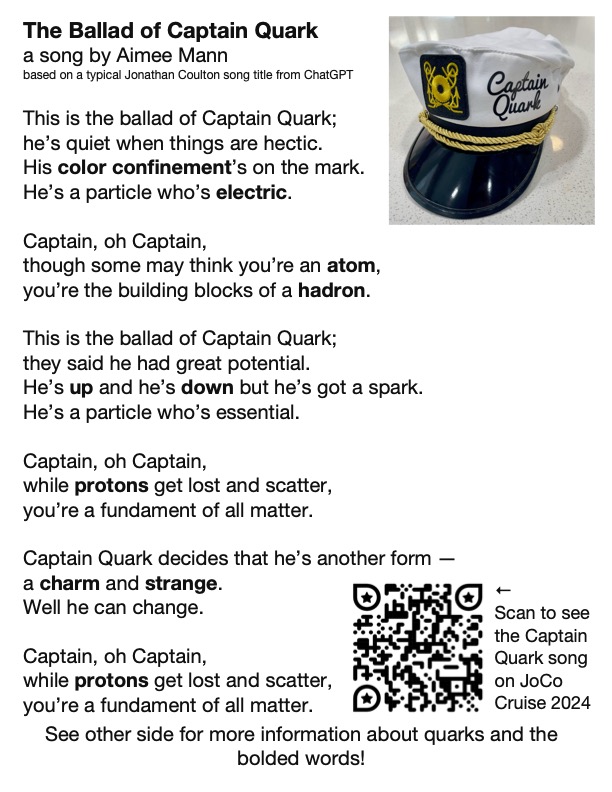
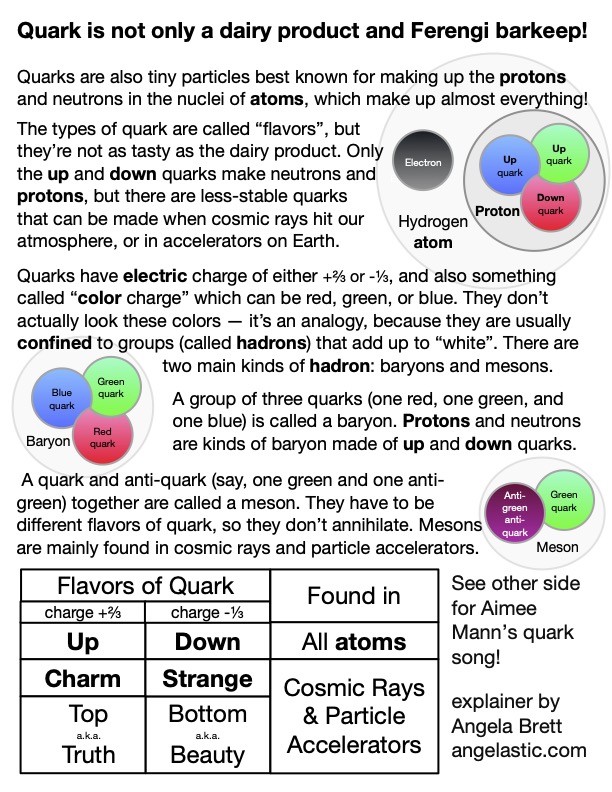
I made it in OmniGraffle, because that seems to be my default these days. I didn’t have room to explain as much about colour confinement as I would have liked, and colour confinement is pretty neat (as is this animation of it.) Since Captain Day happened to be on the same day as the Open Mic, Joey Marianer sang part of The Ballad of Captain Quark, and then I followed up with what would be on the sequel postcard — my poem Juratron Park (which is available on my album!), and an explanation of that:
I recorded the rest of the open mic too… if you performed there, let me know if it’s okay to publish video of you, and what links or other information you want me to put in the video description.
On the subject of video, I uploaded my video from the Queen Mary 2 leaving Southampton, which I mentioned in my last post, and I’m now busy watching, writing descriptions for, and uploading my videos from the 2025 JoCo Cruise.
On the subject of JoCo Cruise, the 2026 cruise is already sold out, with a long waitlist, but there is currently a possibility to add a second cruise the week immediately after that one, from March 28 to April 4 2026, leaving from San Diego. If you would like to be on that, and you haven’t already booked for the existing JoCo Cruise 2026, you can make a fully-refundable deposit. Deposits may be placed until Monday, April 7th at 8 pm EDT, and my understanding is the number of deposits they get by then will determine whether this second cruise becomes a reality. If it does, people already booked on the original cruise will have the opportunity to switch to the second one or book both.
On the 2024 cruise, Joey and I met someone wearing an ‘🌈I’ve got anxiety✨’ T-shirt, and Joey pretty much immediately wrote a barbershop tag about it (which we then sang two parts of to the shirt-wearer.) Joey has since found a workable way to record all the parts and put them together, so here it is, along with the shirt design:
Please feel free to replace the anxious voices in your head with this. Just sing at them when they try to tell you bad things. Earworms vs. Brainweasels: Fight!
Now for some updates on things mentioned in my last post. Joey and I have now finished watching Star Trek: Deep Space Nine, watched this chat between Wil Wheaton and Cirroc Lofton, and started watching Star Trek: Voyager, interspersed with episode recaps from The Delta Flyers podcast.
I’m still looking for a job, and working on the app I mentioned in my last post. Currently I’m learning about CloudKit, concurrency in SwiftData, and strict concurrency checking in Swift 6. I’ll be attending Deep Dish Swift in less than a month to learn about all sorts of other things.
That’s all from me; please enjoy CERN’s April Fools joke for this year.
Lifetiler for macOS: it’s like a temperature quilt for your life
Posted by Angela Brett in My Software on November 13, 2024
TL; DR: I wrote a macOS app called Lifetiler that can be used to chart your life with an emoji or colour for each day, and you can download it here.
If you’ve been following me for a while, you know I was in a long-distance relationship with Joey Marianer for several years. We met on JoCo Cruise, communicated a lot on FaceTime, and visited each other a few times a year when possible. Eventually we got married, and two and a half years later we moved in together.
On 7 August 2022, I had several hours to spare in an airport business lounge after Joey had left, so I started writing an app called Lifetiler to chart how many days we’d been together in-person. As I write this on 12 November 2024, we’ve been together in-person for 323 days of the 2811 days we’ve known each other, in 15 contiguous stretches. That makes this our 14th date, since we didn’t start dating until the second time we met. We’re on track to have been together in-person for 365 days on December 24.

But I digress. I don’t need to keep track in the app any more, because we live together! But I’ve continued working on the app to make it usable for people who aren’t me, and now it’s on the App Store. For now it’s $2.99 in the US store, because that’s <3, which makes a heart. ❤️ Whether the price stays that low depends on how soon I get a day job.
In the app you can date ranges with colors or emoji indicating what happened on those days. You can then export a chart as an image or a series of emoji. You can choose how many days to show per row or column, and the app will suggest numbers that will give you a full rectangle without gaps at the end. Here is an image chart of Joey’s and my first 256 days together in-person:
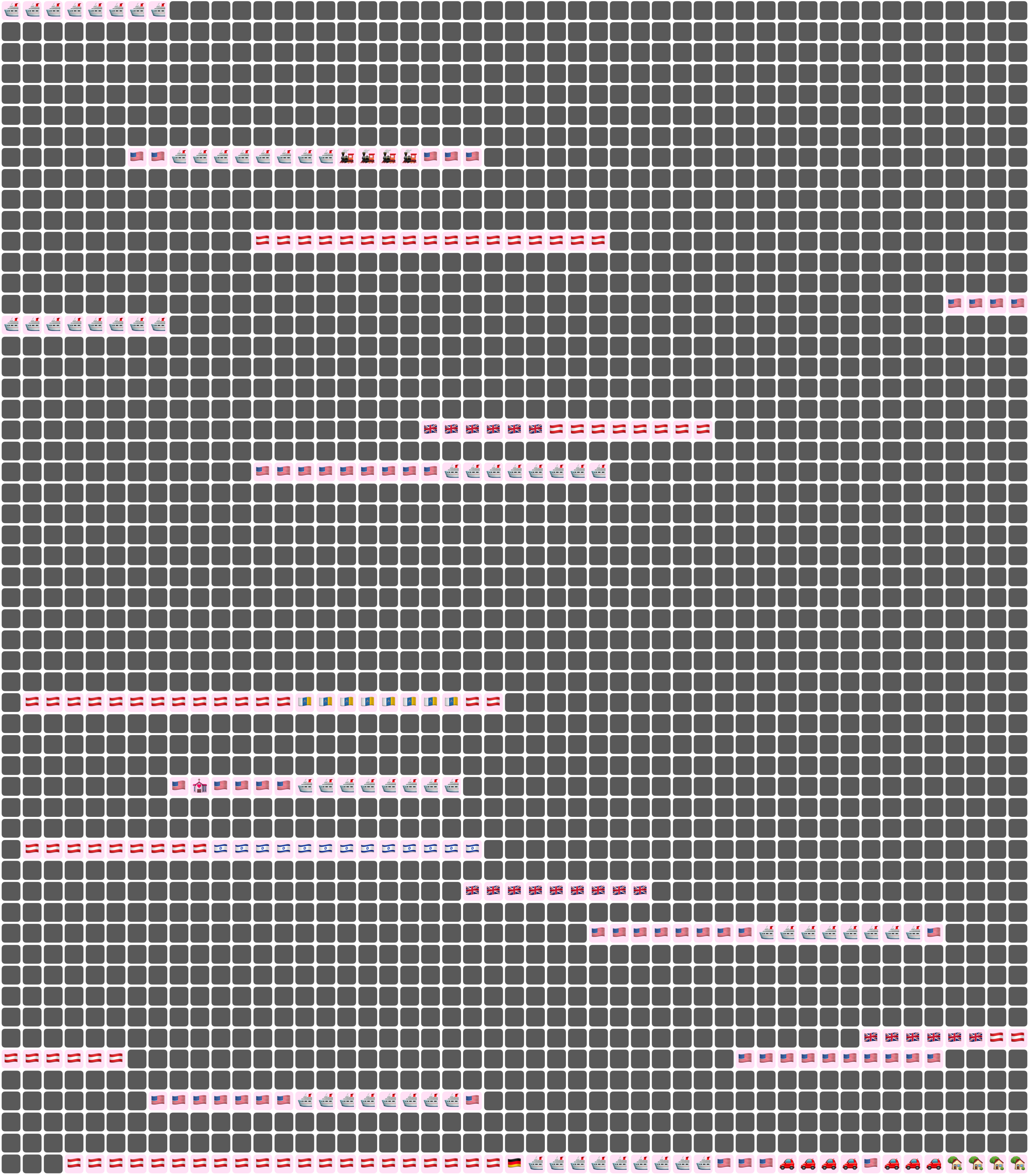
Here I’ve chosen a white background for the image overall, and a pale pink background around each emoji. Dates where we weren’t together (i.e. dates which aren’t included in any date ranges) are dark grey squares.
In an text (emoji) export, colours will be converted to the closest square emoji. I’m not going to paste the emoji version of the Joey document inline because it’s quite large, but here it is as a file:
It’s also possible to show the same document in a ‘simplified’ mode, with the same colour or emoji for all days that are within date ranges — so in our case, I used a heart for every day we were together. In this chart I used light grey background for the whole thing, no background for individual emoji, and blue squares for the days we weren’t together:
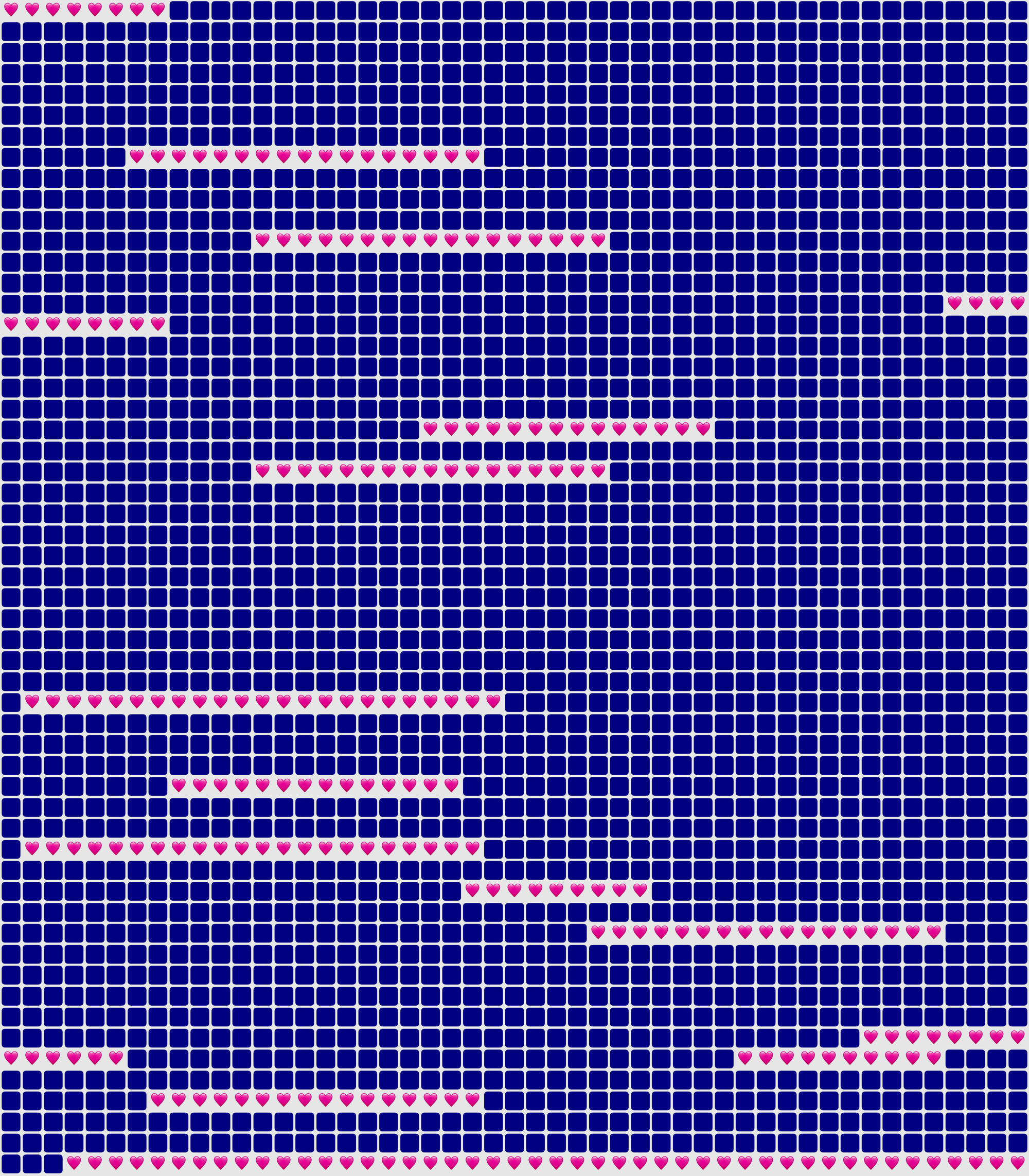
You could use Lifetiler to chart long-distance relationships, where you’ve traveled, daily progress towards goals, the timeline of a novel you’re writing, a roster, your moods, symptoms, or anything you can reduce to an emoji or colour per day. It’s a document-based app, so you can have separate documents for whatever you want to chart. I’d be quite interested in knowing what you use it for! If you’re unsure what the most important thing to show on a given day is, you can have overlapping date ranges, so there’d be more than one emoji or colour on a given day, then choose which one you want shown in an emoji or image export.
I developed Lifetiler as a multi-platform SwiftUI app, which means I can easily make an iOS version which will open the same documents. That’s one of the next things on my to-do list, but since I’ve personally been using the app mainly on macOS, I would like to do substantial testing on iOS before I release it.
Here’s that App Store link again so you don’t have to go looking for it now that you know what the app does. Enjoy!
This is when the [poster] wall comes down
Posted by Angela Brett in Moving to the USA on November 11, 2024
Here’s a video in which I take down my posters in my apartment in Vienna, in order to pack them up to move to the USA. It includes improvised song parodies and silly jokes from Joey Marianer and myself.
I took this video partly to have a record of my poster wall (though I also have a photo of it which I sometimes use as a Zoom background) and partly because if I get permission to do so, I’ll make a music video of Sam Bettens’ song ‘Go’ documenting the entire move, and a sped-up version of this video will be used for the lyric ‘this is when the wall comes down’. For now I’ve just used that one clip of the song, since I suppose it’s short enough to be fair use. Other songs referenced in the video are:
- Guy Williams’ National Anthem of Libya from Taskmaster New Zealand
- Another Lobster, by Kornflake (which is a parody of Another Postcard, by Barenaked Ladies, but I realised when watching that yesterday that I hadn’t actually heard it before, and only knew of it via Another Lobster)
- Another Brick in the Wall by Pink Floyd
- Want You Gone by Jonathan Coulton, as sung by Ellen McLain on the Portal 2 soundtrack (it just seemed appropriate to end with ‘gone’, since I was starting with ‘Go’)
My posters are still in a crate on a truck somewhere between Montréal and here, so my home office currently only has a map of the route we took on the Queen Mary 2, and a Dogcow print, which I had wanted for a while but wasn’t prepared to pay the shipping and import fees for while I was living in Austria.
Aside from the music video, I have several other videos about moving here that I still need to edit, including:
- several hours of 4K footage from the Queen Mary 2 as it left Hamburg
- several more hours of 4K footage from the Queen Mary 2 as it arrived in New York.
- at least one more clip from MoMath
- various clips taken on my phone during our road trip from New York to my new home in the Seattle area
So watch this space! (I’m adding links as I upload the videos mentioned) Or subscribe to my YouTube channel and watch that space instead.
I’ll also put more photos from the trip on Flickr, so that’s another space you can watch. For now I’ve only put up panoramas from our pre-move trip to Fügen, our view of New York from the Queen Mary 2, and our road trip from NYC to Seattle.
In other news, Joey and I once again went to the MathsJam Annual Gathering in the UK. We didn’t give any talks, participate in the bake-off, enter a competition in the competition competition, or write any new parody songs for the MathsJam Jam this time. I won one of the competition competition competitions by writing the joke ‘What do you get if a Platonic solid loses a duel with its dual’ for the pre-determined punchline ‘the phantom of the solid’, but even that was just based on a poem I wrote (and performed) previously. We did, however, participate in Taskmathster as one of the Saturday evening activities, then two days later in London, we did the Taskmaster Live Experience. Both were a lot of fun!
Also, I have just released a new Mac app! It’s the one I made to create charts of days Joey and I have spent together while living apart (as seen in my previous post about moving to the USA). I’ll post more about it later today, but I think it needs its own post.

This work is licensed under a Creative Commons Attribution-Noncommercial-Share Alike 3.0 Unported License.
Please tell me if you do something cool with it.

 Creative Output
